Introduction
Microsoft Intune is the modern way of managing devices. It also comes with capabilities for us to automate tasks which the IT engineers are doing manually. In this article I’ll go through multiple of ways to enroll a Windows device into Microsoft Intune.
OOBE Enrollment
We can enroll a device into Microsoft Intune in the OOBE stage with the following steps.
- Open
cmd.exewithSHIFT + F10. - Use
powershell.exe -ep bypassinside the terminal. - Use
Install-Script Get-WindowsAutopilotInfo -Forceto download the Windows Autopilot script. - Use
Get-WindowsAutopilotInfo -Online -GroupTag NO1to enroll the device into Microsoft Intune. - Use your company credentials at login prompt.
- Use
shutdown -r -t 0to reboot the system.
Once these steps are completed a Microsoft login page with the company logo should come up. Where the user can login to enroll the laptop into Microsoft Intune.
Hash Extraction Enrollment
We can also enroll a Windows device into Microsoft Intune by extracting the laptop hash.
- Attach a USB into the Windows device.
- Open
cmd.exewithSHIFT + F10. - Use
Install-Script Get-WindowsAutopilotInfo -Forceto download the Windows Autopilot script. - Use
Get-WindowsAutopilotInfo -GroupTag <TAG> -OutputFile D:\SERIALNUMBER.csvto extract hash. - Upload the
SERIALNUMBER.csvthrough Windows Autopilot Devices.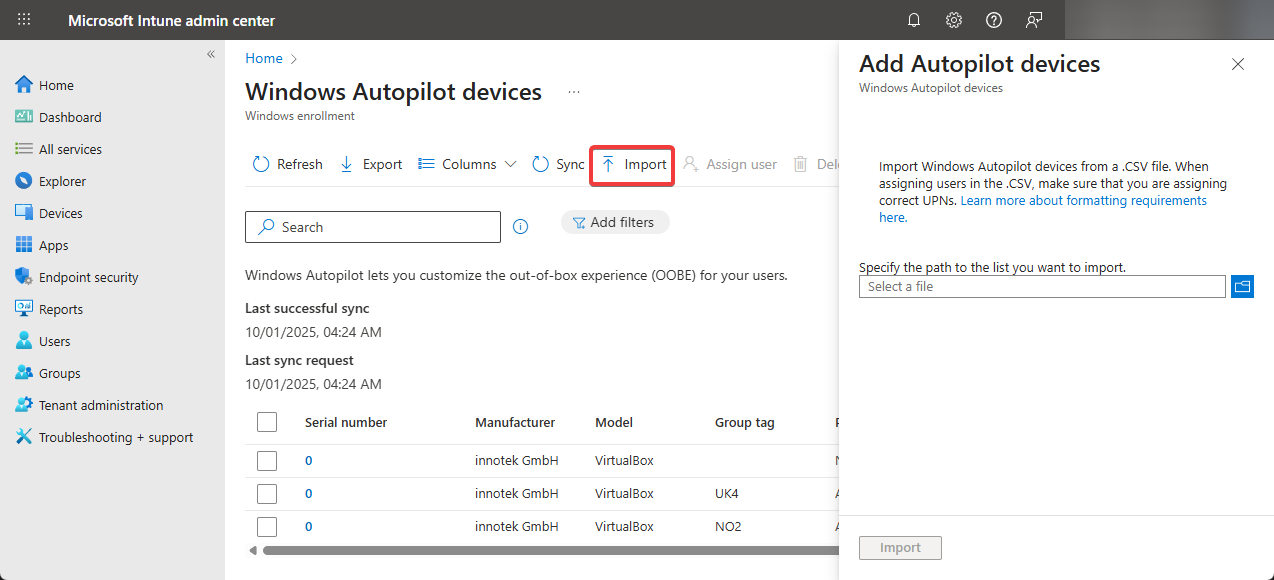
- Wait 15 minutes and reboot the system.
After rebooting a Microsoft login page with the company logo should come up and from there the user can start logging in and start enrolling the Windows device into our Microsoft Intune environment.
Troubleshooting Issues
If you experience any issues during the enrollment of these PCs, I recommend checking out the following file:
C:\ProgramData\Microsoft\IntuneManagementExtension\Logs\AppWorkload.log
Conclusion
The OOBE Enrollment is the easiest and most efficient way of uploading a laptop hash into Microsoft Intune. However, the Hash Extraction Enrollment is also great for uploading laptop hashes into Microsoft Intune especially if you don’t have physical access to the system as you can request the user to execute these commands and send the hash file to us.