Introduction
So around a month ago, I was in communication with the Infrastructure Team about hardening the Windows Servers in Azure since there are some configurations that can be applied to further secure these servers. During the meeting the Infrastructure Team mentioned Azure Machine Configuration which could be used for hardening the Windows Servers without needing them to be domain-joined. So, I decided to deep dive into Azure Machine Configuration!
After spending weeks on and off working on Azure Machine Configuration, I managed to create a Proof of Concept. I decided to create this article since there were a-lot of issues that I faced while setting up Azure Machine Configuration which wasted a-lot of working hours. I hope this article can help you with not losing these work hours.
What is Azure Machine Configuration?
Azure Machine Configuration is a way to audit and apply the necessary changes to all the virtual machines in your Azure environment including Windows and Linux operating systems. As an example Husenjan LLC has acquired Cosmos LLC and the Infrastrucutre Team isn’t happy with time-zone on all the servers of Cosmos LLC. Instead of logging into all the servers and changing the time-zone manually which would take hours to days they can instead setup Azure Machine Configuration to do these changes. The sky is the limit with Azure Machine Configurations since we can do any changes necessary.
Additionally, Azure Machine Configuration can also be used to enforce specific configuration on Hybrid Environments where Azure Arc is installed on the different on-premise virtual machines. The right-way to look at Azure Machine Configuration is a unified way to manage all VMs in Azure with minimal effort.
Requirements
- Azure Roles
- Security Administrator.
- Resource Policy Contributor Role at Subscription Scope.
- Owner at Resource Group/Subscription Scope.
- PowerShell Libraries
GuestConfigurationPSDscResourcesPSDesiredStateConfiguration
- Azure Resoures
- Azure Storage Account.
- PowerShell Version
- PowerShell 7.6.X
Prerequisites for VMs
- Extension: All VMs must have the Azure Machine Configuration extension installed on them otherwise the changes won’t be applied to VMs.
- Outbound Internet: All VMs must have a outbound access to port 443 to retrieve the ZIP package from Azure Blob Container.
Setting Up PowerShell Libraries
We can install the PowerShell libraries using the following instructions.
Install-Module -Name GuestConfiguration
Install-Module -Name PSDscResources
Install-Module -Name PSDesiredStateConfiguration
Developing Azure Machine Configuration
Predefined Variables
#
# Purpose: This is a variable responsible for version control.
#
$version                    = '1.0.0'
$policy_id                  = 'XXXXXX-XXXX-XXXX-XXXX-XXXXXXXXXX'
$az_blob_name               = "AzureMachineConfigurationExample_$version.zip"
$az_blob_container_name     = 'AZ-Machine-Config'
$build_directory            = "$PSScriptRoot\build"
$az_blob_connection_string  = 'XXX'
$subscription_id            = 'XXXXXXXX-XXXX-XXXX-XXXX-XXXXXXXXXXXX'
The predefined variables are menat to make it easier for us to manage Azure Machine Configuration. Here is a overview of all the different variables and their purposes:
$version: Allows us to do version control.$policy_id: Generate a GUID using the command(New-Guid).Guidand use that as Policy ID.$az_blob_name: Name of the ZIP package which will be uploaded to blob container.$az_blob_container_name: Name of the container which ZIP package will be uploaded.$az_blob_connection_string: The access key which will be used to access to Azure Storage Account.$subscription_id: The Subscription ID which you have resource policy contributor role over.
I understand that there is a-lot of information to consume about variable names. However, it will make sense why our configuration has predefined variable names going through the next sections.
Core of Azure Machine Configuration
#
# Purpose: Machine Configuration Setup
#
Configuration AzureMachineConfigurationExample {
    Import-DscResource -ModuleName PSDscResources -ModuleVersion '2.12.0.0'
    Node localhost {
        #
        # Purpose: Installs specific version of Azure CLI.
        #
        Script EnforceAZCliVersion {
            GetScript = {
                try {
                    $current_version = az version | ConvertFrom-Json | Select-Object -ExpandProperty "azure-cli"
                    return @{ "Result" = "$current_version"}
                } catch {
                    return @{ "Result" = "Failed to compute az version, error $_" }
                }
            }
            TestScript = {
                try {
                    $current_version = az version | ConvertFrom-Json | Select-Object -ExpandProperty "azure-cli"
                    $desired_version = "2.49.0"
                    if ($current_version -eq "$desired_version") {
                        return $true
                    }
                    else {
                        return $false
                    }
                }
                catch {
                    return $false
                }
            }
            SetScript = {
                Write-Output "Need to set new version."
            }
        }
        #
        # Purpose: Disables SMBv1 on Windows Server.
        #
        Registry DisableSMBv1 {
            Key = 'HKEY_LOCAL_MACHINE\SYSTEM\CurrentControlSet\Services\LanmanServer\Parameters'
            ValueName = 'SMB1'
            ValueData = '0'
            ValueType = 'DWord'
            Ensure = 'Present'
            Force = $true
        }

        #
        # Purpose: Disables USB Autorun on USB devices.
        #
        Registry DisableUSBAutoRun {
            Key = 'HKEY_LOCAL_MACHINE\SOFTWARE\Microsoft\Windows\CurrentVersion\Policies\Explorer'
            ValueName = 'NoAutorun'
            ValueData = '1'
            ValueType = 'DWord'
            Ensure = 'Present'
            Force = $true
        }

        #
        # Purpose: Disables Autoplay on MTP devices.
        #
        Registry DisableAutoplayMTP {
            Key = 'HKEY_LOCAL_MACHINE\SOFTWARE\Microsoft\Windows\CurrentVersion\Policies\Explorer'
            ValueName = 'NoDriveTypeAutoRun'
            ValueData = '255'
            ValueType = 'DWord'
            Ensure = 'Present'
            Force = $true
        }
    }
}

#
# Description: Executes the AzureMachineConfigurationExample function and creates a localhost.mof file.
#
AzureMachineConfigurationExample -OutputPath $build_directory
This is the core component of Azure Machine Configuration since it allows us to Audit and Enforce configurations. The EnforceAZCliVersion will ensure that specific version of Azure CLI is installed on the VM and the registry keys will disable SMBv1, Autorun for USB, and Autoplay for MTP devices. At the very end we are running the function since that will create a localhost.mof file which we need for the next section.
PowerShell Version
You must use PowerShell 7.6.X to compile the Azure Machine Configuration otherwise some issues will occur such as failing to encode characters.
Building ZIP Package
#
# Description: Building the ZIP configuration package.
#
$params = @{
    Name = "AzureMachineConfigurationExample"
    Configuration = "$build_directory\localhost.mof"
    Type = 'AuditAndSet'
    Path = $build_directory
    FrequencyMinutes = 15
    Version = $version
    Force = $true
}
New-Item -ItemType Directory -Path $build_directory -Force | Out-Null
Add-Type -AssemblyName "System.IO.Compression.FileSystem"
$package = New-GuestConfigurationPackage @params

#
# Description: Running to see if its working as expected.
#
Get-GuestConfigurationPackageComplianceStatus $package.Path
Once the localhost.mof file is built we can now package the file into a ZIP file. The only thing that is important to pay attention to is FrequencyMinutes since for testing purposes I choose 15 minutes and I would recommend extending it to your preference.
PowerShell Version
You must use PowerShell 7.6.X to compile the Azure Machine Configuration otherwise some issues will occur such as failing to encode characters.
Uploading ZIP Package to Azure Blob Container
#
# Description: Uploading the ZIP file into Azure blob container.
#
$context = New-AzStorageContext -ConnectionString $az_blob_connection_string
Set-AzStorageBlobContent -Context $context -Container $az_blob_container_name -File $package.Path -Blob $az_blob_name -Force

#
# Description: Generating SAS Key.
#
$context = New-AzStorageContext -ConnectionString $az_blob_connection_string

$startTime = Get-Date
$endTime   = $startTime.AddYears(3)
$tokenParams = @{
    StartTime  = $startTime
    ExpiryTime = $endTime
    Container  = $az_blob_container_name
    Blob       = $az_blob_name
    Permission = 'r'
    Context    = $context
    FullUri    = $true
}

$content_uri = New-AzStorageBlobSASToken @tokenParams
So basically this code is responsible for uploading the ZIP package to Azure Blob Container. Then it will generate a SAS Key with 3 years of expiry time which will be used by VMs to retrieve the ZIP package.
Creating Azure Policy Definition
#
# Description: Creating the Azure Policy package.
#
$policy_config = @{
	PolicyId = $policy_id
	ContentUri = $content_uri
	DisplayName = 'Azure Machine Configuration Example'
	Description = 'This package is meant to harden the Windows Server by disabling SMBv1, Autoplay/Autorun, and much more...'
	Path = "$PSScriptRoot/policies/auditIfNotExists.json"
	Platform = 'Windows'
	PolicyVersion = $version
    Mode = 'ApplyAndAutoCorrect' # Use Audit or ApplyAndAutoCorrect
}

$policy = New-GuestConfigurationPolicy @policy_config
New-AzPolicyDefinition -Name $policy_id -Policy $policy.Path -SubscriptionId $subscription_id
Finally, this code is responsible for creating the Azure Policy Definition which we can use to assign to specific Resource Group, Subscription Scope, and Tenant Group. Please keep in mind that ApplyAndAutoCorrect will enforce the configurations while Audit will monitor to see if the VMs are compliant.
Assigning Policy
We can assign the Azure Policy Definition which we created through the following steps.
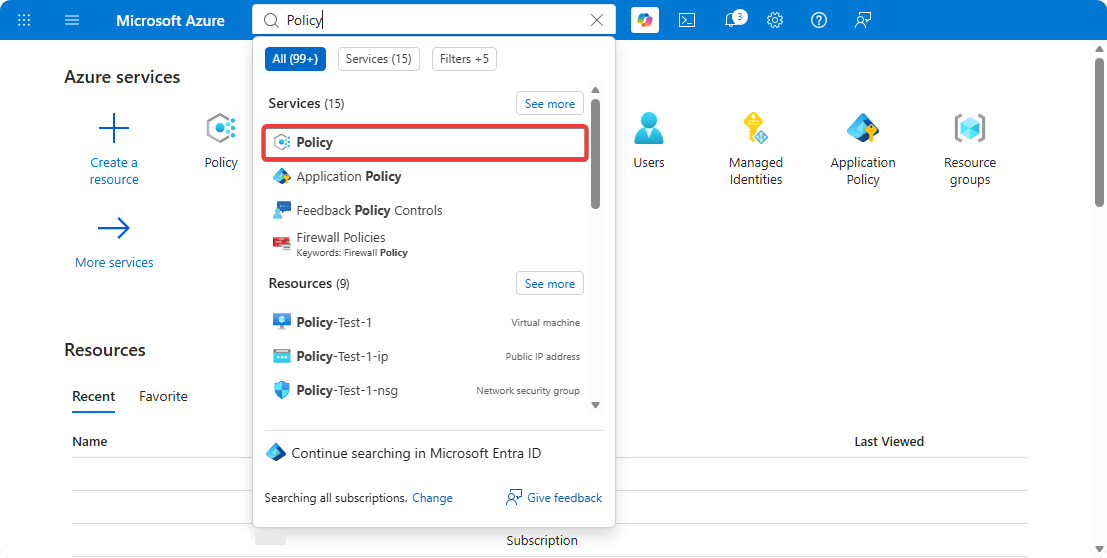
- Go to Azure Portal → Policy.
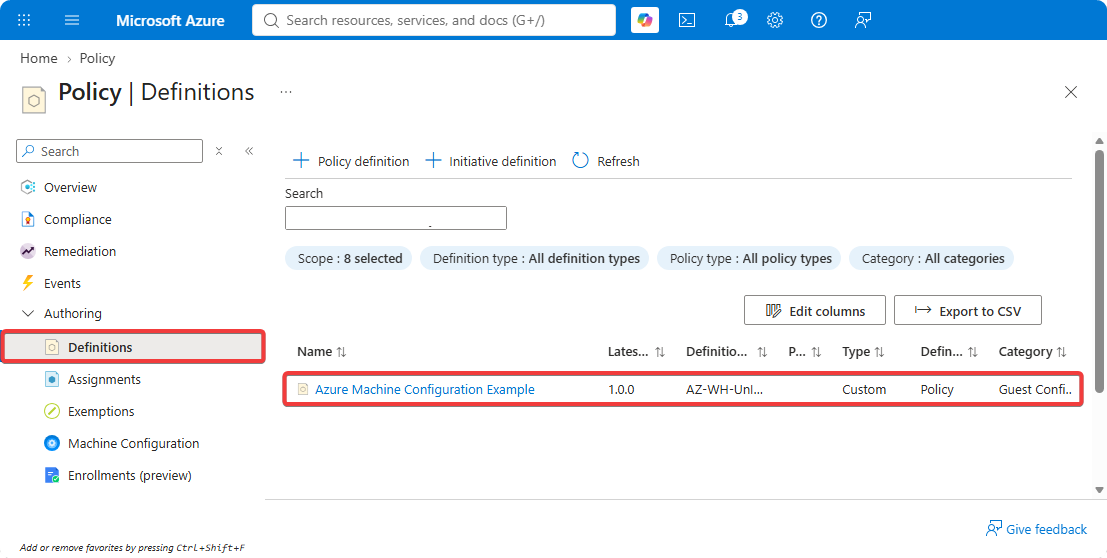
- Click on Authoring → Defintiion.
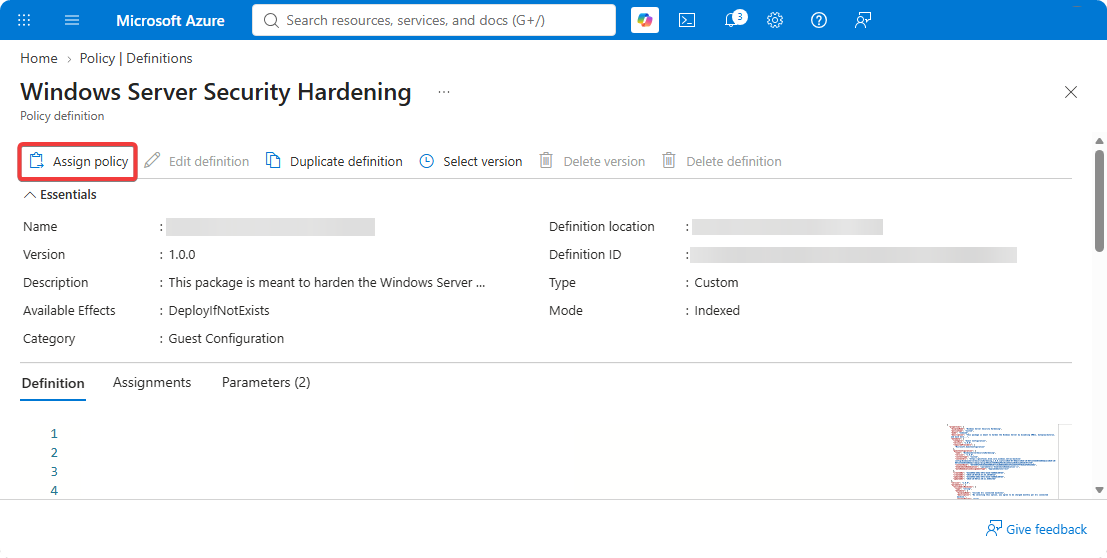
- Assing the Azure Machine Configuration to a Resource Group for testing.
Troubleshooting
If you’re experiencing issue with Azure Machine Configuration, I would highly recommend checking out the files inside of the following directory.
C:\ProgramData\GuestConfig\gc_agent_logs
Conclusion
I initially thought setting up Azure Machine Configuration seemed too complex for our environment. And after diving into it and learning a-lot about it, I see Azure Machine Configuration in a different way where it can be used for enforcing specific configuration for all virtual machines in our environment instead of only the ones that are domain joined.
This can especially become useful in environments where a company has acquired another company and a specific configurations have to be enforced through all VMs. Additionally, this can also be useful for hybrid environments where Azure Arc is installed on on-premise servers since that allows us to enforce specific configurations on these machines through Azure.