Introduction
Windows Event Viewer consists of a-lot of informations such as login attempts, account updates, computer account updates and much more. Nowadays all logs inside of Windows Event Viewer is sent over to Microsoft Sentinel where the data can be fecthed using KQL.
However, in the offshore industry in some circumstances the event viewer logs aren’t sent over to Microsoft Sentinel because of brandwidth costs or that the company doesn’t have the budget to send extreme amount of data to Microsoft Sentinel. In these circumstances python libraries such as Python-EVTX will come in handy, as these will allow us to quickly investigate security incidents through a pre-built script.
Event Viewer Logs
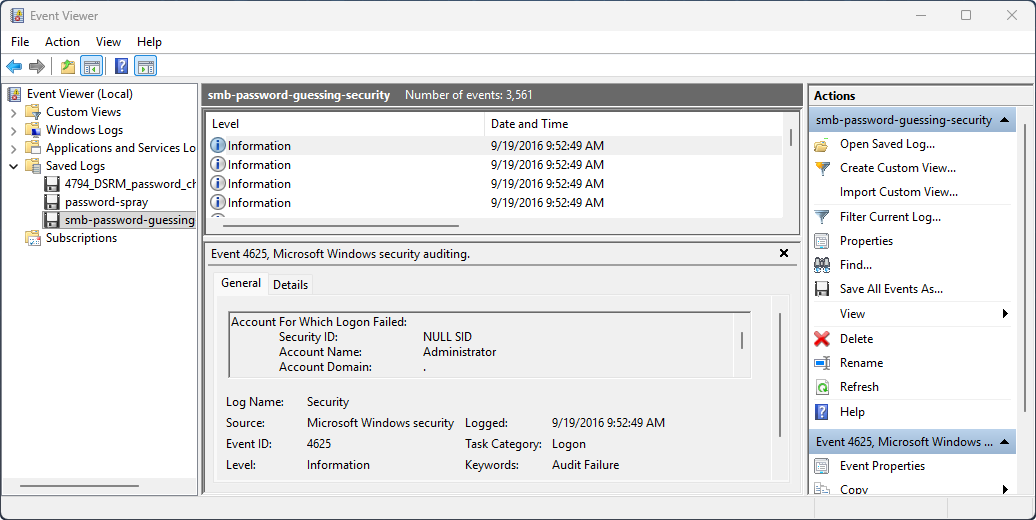
All events in WIndows is assigned a EventID which identifies the purpose of the event. An example a Event ID: 4624 means the user successfully logged on meanwhile the Event ID: 4625 means the user failed to login because of invalid credentials.
The Windows Security Log Events is a great resource for finding and learning about all the different Windows Event IDs. I would highly recommend checking out Rany’s work.
Sorting Events
Anyway enough with technical details let’s build a python script which will detect total amount of failed logins that occurred in our active directory environment. I’ll be using the event viewer sample data from DeepBlueCLI since I’m writing a blog which will be publicly available.
import argparse
from enum import Enum
import Evtx.Evtx as evtx
import xml.etree.ElementTree as et

# XML namespace for Windows Events
ns = {"ns": "http://schemas.microsoft.com/win/2004/08/events/event"}

def risk_evaluation(logs):
    # Converting logs to a dict object to count total failed logon attempts
    dlogs = {i:logs.count(i) for i in logs}

    # Checking the danger for username
    for (key, value) in dlogs.items():
        if value > 10:
            print(f"[#] Suspicious Activities (RISK HIGH)")
            print(f"[*] Username: {key}")
            print(f"[*] Total Failed Logon: {value}\n")
        elif value > 5:
            print(f"[#] Suspicious Activities (RISK MEDIUM)")
            print(f"[*] Username: {key}")
            print(f"[*] Total Failed Logon: {value}\n")
        else:
            print(f"[#] Suspicious Activities (RISK LOW)")
            print(f"[*] Username: {key}")
            print(f"[*] Total Failed Logon: {value}\n")

def main():
    # Script parameters
    parser = argparse.ArgumentParser()
    parser.add_argument("evtx", help="Enter the EVTX file location", type=str)
    parser.add_argument("eventid", help="Enter the event id to use for filtering", type=str)
    parser.add_argument("--username", default="", help="Enter the username for filtering", type=str)
    args = parser.parse_args()

    # mlogs: used when --username parameter is empty
    mlogs = []
    # slogs: used when --username paramter is in use
    slogs = []

    # Opening Evtx File
    with evtx.Evtx(args.evtx) as log:
        # Going through records inside EVTX file
        for event in log.records():
            # Parsing the XML data from EVTX file
            root = et.fromstring(event.xml())
            # Getting EventID from events
            event_id = root.findtext(".//ns:EventID", namespaces=ns)

            # Checking if EventID matches user input EventID
            if event_id == args.eventid:
                # Getting the Data field from event
                for data in root.findall(".//ns:Data", namespaces=ns):
                    name = data.get("Name")

                    if name == "TargetUserName":
                        # Field is used when --username parameter is in use
                        if data.text == args.username and len(args.username) > 0:
                            slogs.append(data.text)
                        else:
                            mlogs.append(data.text)

    # Calling risk_evaluation function
    if len(slogs) > 0:
        risk_evaluation(slogs)
    else:
        risk_evaluation(mlogs)

main()> python .\main2.py --evtx events/smb-password-guessing-security.evtx --eid 4625
[#] Suspicious Activities (RISK LOW)
[*] Username: JcDfcZTc
[*] Total Failed Logon: 1
[#] Suspicious Activities (RISK HIGH)
[*] Username: Administrator
[*] Total Failed Logon: 3560This simple python script will allow us to investigate our environment 10x quicker rather than spending time on manually going through each event and manually counting them. I’ll be blogging about more about this library once I find out what other things are possible with it.
Conclusion
Many security engineers uses event viewer to investigate security incidents but that is ineffective since it requires a-lot of manual labour. Instead we should build python scripts using libraries such as pyhton-evtx to detect threats within our active directory environment. Anyway, I hope this article was a good resource for someone who needed it.