Introduction
This is a continuation of the Detecting Malware with Yara Rules (Part 1) article. In this article I’ll go through detecting real malwares using Yara Rules by using the PE Header from these executables. If you haven’t read through the previous article I would highly recommend to do so as it builds upon this one.
PE Header

The PE Header of a process has a lot of information such as compilation metadata, import table, export table, and operating system version. Rather than relying on file hashes to identify threats within our environment, we can instead use the information in the PE Header.
Example (CyberStub)
The CyberStub.exe is a malicious application I downloaded through Baazar Abuse CH. The CFF Explorer is an tool that allows us to inspect the PE Header of the application.
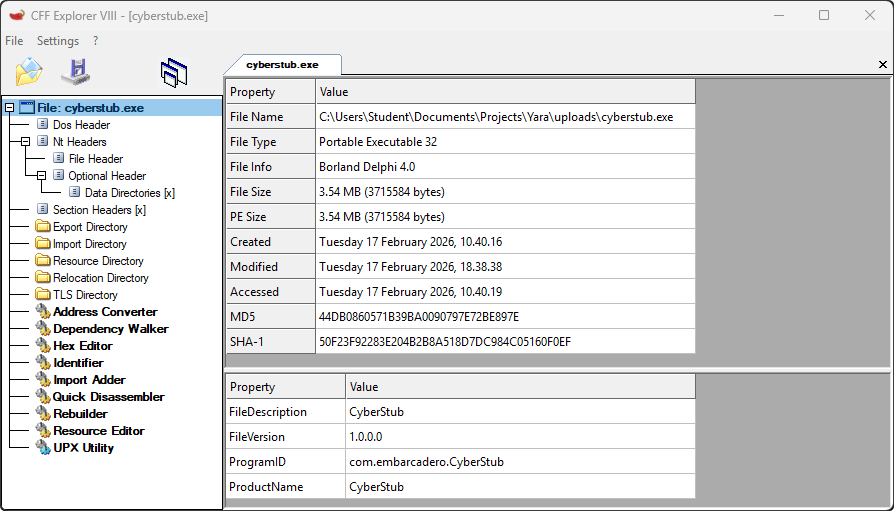
The CyberStub.exe has a ProductName attribute which we can use to detect the threat actor. Instead of relying on single attribute we can go to Optional Header and ensure the same compiler and linker were used to build these files.
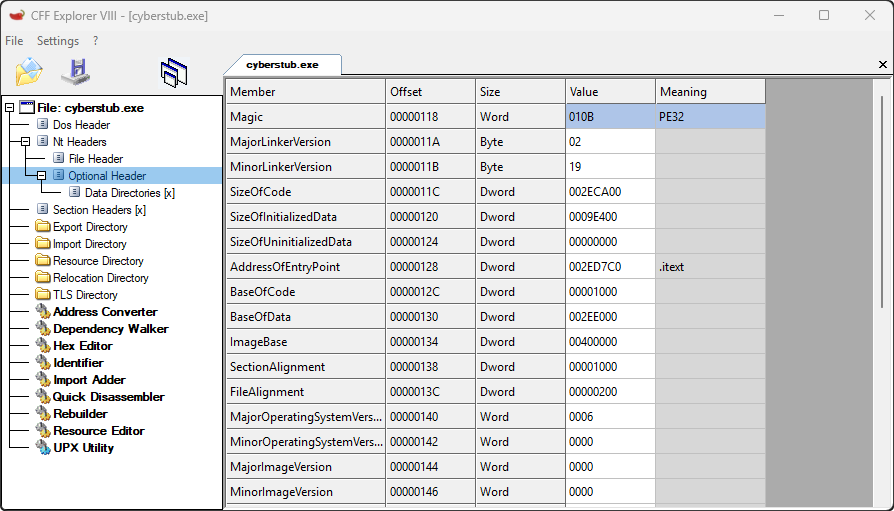
Most threat actors uses the same compiler and linker to build their malicious executable programs so attributes such as MajorLinkerVersion and MinorLinkerVersion is useful to detect threats. Here are all the informations which we obtained from the PE Header:
ProductName=CyberStubMajorLinkerVersion=0x02MinorLinkerVersion=0x19
Using all these informations we can now craft a Yara Rule to identify threats with similar attributes to ensure all our systems are secure.
Yara Rule
The Yara Rule is simple it will analyze all the files and once the attributes ProductName, MajorLinkerVersion, and MinorlinkerVersion matches it will generate an alert to us.
import "pe"

rule CyberStub {
    meta:
        name = "CyberStub Detection Rules"
        description = "Detecting CyberStub malware"
    condition:
        pe.version_info["ProductName"] == "CyberStub" and
        pe.linker_version.major == 0x02 and
        pe.linker_version.minor == 0x19
}import yara
import os
import hashlib
rule = yara.compile(filepath="rule.yara")
def compute_hash(filepath, algorithm="SHA256"):
hash_func = hashlib.new(algorithm)
with open(filepath, 'rb') as file:
while chunk := file.read(8192):
hash_func.update(chunk)
return hash_func.hexdigest()
def ScanFiles(path="."):
for f in os.listdir(path):
full_path = os.path.join(path, f)
if os.path.isdir(full_path):
ScanFiles(full_path)
else:
matches = rule.match(filepath=full_path)
if matches:
print("[#] <Malware Detected>")
print("[+] File Name: " + f)
print("[+] Location: " + full_path)
print("[+] SHA256: " + compute_hash(full_path) + "\n")
ScanFiles("uploads/")[#] Malware Detected
[+] File Name: cyberstub.exe
[+] Location: uploads/cyberstub.exe
[+] SHA256: 334c18a6a2d10c9fda30e5a3f99e23949aa761a1767d915d3922cd83daee5d05We successfully made a Yara Rule which will identify all files that is from a specific threat actors by using PE Header. The reason we are only using ProductName, MajorLinkerVersion, and MinorLinkerVersion is because these are just enough information to identify malicious executables and shared libaries.
Conclusion
Identifying maliicous files using SHA-256 is ineffecitve since the threat actors can change a single byte and it will change the SHA-256 of the file. However, using Yara Rules will force the threat actor to change ProductName, MajorLinkerVersion, and MinorLinkerVersion. Hopefully, this article helped you with understanding Yara rules more!