Introduction
Security Incidents can occur at anytime ranging from low severity to high severity. When a high severity security incident occurs it’s always good to have a security documentation template which you can use to document the security incident. This article will go through building that security incident documentation template using LaTeX.
Why LaTeX?
Many professionals will wonder why I choose LaTex to build the template instead of using Microsoft Word. The reason I choose Latex is because the headers, texts, and images can be updated without breaking the document. Additonally, LaTeX comes with more customization features.
Template Structure
This section will go through each component inside the Security Incident Documentation Template. In Latex the libaries gives us capabilities to customize our document and the required libraries for document is the following.
\documentclass{article}
\usepackage[a4paper,top=2.5cm,bottom=2.5cm,left=2.5cm,right=2.5cm]{geometry}
\usepackage{graphicx}
\usepackage{lipsum}
\usepackage{fancyhdr}
\usepackage{makecell}
\usepackage[sfdefault]{inter}
\usepackage{array, booktabs}
\usepackage{xcolor}
\usepackage{caption}
\usepackage{setspace}
\usepackage{titlesec}
Many organization’s requires that the documents have a specific color on headers and other components inside the document therefore I made a custom color component which changes these.
\definecolor{CompanyColor}{HTML}{5d97aa}
\DeclareCaptionFont{CompanyColor}{CompanyColor}
\newcommand{\TimelineLine}
    {\color{CompanyColor}
    \makebox[0pt]{\textbullet}
    \hskip -3.5pt
    \vrule width 2pt
    \hspace{\labelsep}
}
In some organization it’s also required that the document has company logo at document header therefore I made a component for that also which can be changed by replacing logo.png file.
\pagestyle{fancy}
\renewcommand{\headrulewidth}{0pt}
\setlength{\headheight}{30pt}
\fancyhead[L]{
    \mbox{\makecell[cl]{\includegraphics[height=1.4cm]{Logo.png}}}
    \raisebox{0.2em} {
        \makecell[l]{
            Security Incident Report \\
            Husenjan H.
        }
    }
}

% Removing page number from footer (remove this if you want to keep page number)
\pagestyle{fancy}
\cfoot{}
I also applied 1.5 linespace for the document because it helps with improving readability of the document. If you want to keep 1 linespace for the document be free to remove it from the document.
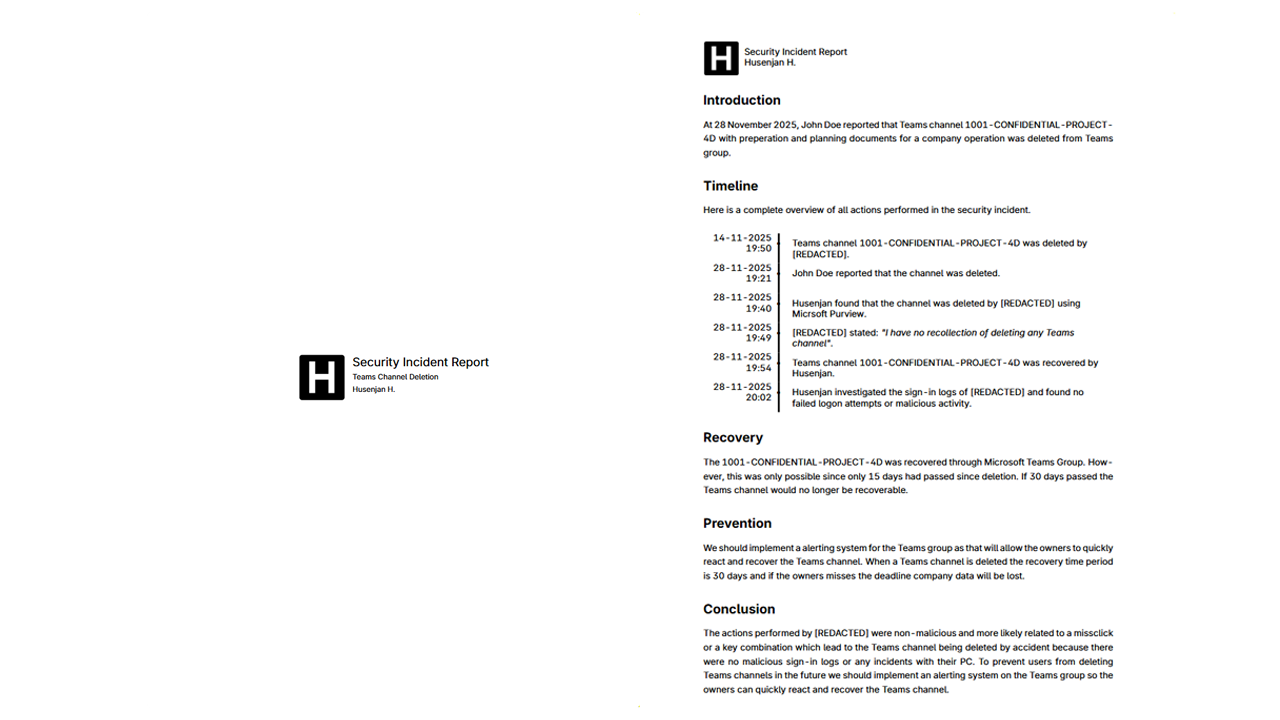
\renewcommand{\baselinestretch}{1.5}The first page of the document will show the company logo, incident title, and author of the document. This helps with making the document more professional.
\begin{document}
    \begin{titlepage}
        \centering
        \hspace{0pt}
        \vfill
        \mbox{
            \makecell[cl]{\includegraphics[height=2cm]{Logo.png}}
        }
        \raisebox{0.3em}{
            \makecell[l]{
                {\Large Security Incident Report} \\
                {\small Teams Channel Deletion} \\
                {\small Husenjan H.}
            }
        }
        \vfill
        \hspace{0pt}
    \end{titlepage}

    ...

\enc{document}
The second page is the incident page which will contain information about the incident and the timeline all actions occurred as that will help the management with understanding what happened, how it happened, and why it happened.
\begin{document}

    ...

    \section*{Introduction}

    At 28 November 2025, John Doe reported that Teams channel 1001-CONFIDENTIAL-PROJECT-4D with preperation and planning documents for a company operation was deleted from Teams group.

    \section*{Timeline}

    Here is a complete overview of all actions performed in the security incident.

    \begin{table}[ht]
        \centering
        \begin{tabular}{@{\,}r<{\hskip 2pt} !{\TimelineLine}>{\raggedright\arraybackslash}p{12cm}}
            \addlinespace[1.5ex]
            \makecell[r]{14-11-2025 \\ 19:50} & Teams channel 1001-CONFIDENTIAL-PROJECT-4D was deleted by [REDACTED].\\[1.5em]
            \makecell[r]{28-11-2025 \\ 19:21} & John Doe reported that the channel was deleted.\\[1.5em]
            \makecell[r]{28-11-2025 \\ 19:40} & Husenjan found that the channel was deleted by [REDACTED] using Micrsoft Purview.\\[1.5em]
            \makecell[r]{28-11-2025 \\ 19:49} & [REDACTED] stated: \textit{"I have no recollection of deleting any Teams channel"}. \\[1.5em]
            \makecell[r]{28-11-2025 \\ 19:54} & Teams channel 1001-CONFIDENTIAL-PROJECT-4D was recovered by Husenjan.\\[1.5em]
            \makecell[r]{28-11-2025 \\ 20:02} & Husenjan investigated the sign-in logs of [REDACTED] and found no failed logon attempts or malicious activity.\\[1.5em]
        \end{tabular}
    \end{table}
    \vspace{-1.5em}

    ...

\end{document}
After the timeline we can add information about the recovery, prevention, and conclusion which will contain more technical details about the security incident.
\begin{document}

    ...

    \section*{Recovery}
    The 1001-CONFIDENTIAL-PROJECT-4D was recovered through Microsoft Teams Group. However, this was only possible since only 15 days had passed since deletion. If 30 days passed the Teams channel would no longer be recoverable.

    \section*{Prevention}
    We should implement a alerting system for the Teams group as that will allow the owners to quickly react and recover the Teams channel. When a Teams channel is deleted the recovery time period is 30 days and if the owners misses the deadline company data will be lost.

    \section*{Conclusion}
    The actions performed by [REDACTED] were non-malicious and more likely related to a missclick or a key combination which lead to the Teams channel being deleted by accident because there were no malicious sign-in logs or any incidents with their PC. To prevent users from deleting Teams channels in the future we should implement an alerting system on the Teams group so the owners can quickly react and recover the Teams channel.

    ...

\end{document}
Conclusion
LaTex is an extremely powerfull tool which allows us to customize anything in a document. It’s great for situations where the headers, texts, and images needs to be quickly updated or changed because these changes can be applied without breaking the document which happens frequently with Microsoft Word. Another reason LaTex is much better than Microsoft Word is because the product is free.