About Project
The Security Asset Platform is a project I decided to build to increase my knowledge about software development and cybersecurity. The idea is to build a application using C++ or Rust which sends changes occurring on the system to a backend API and use these datas to summarize logs from the servers. I will be open sourcing once the product is ready to be used in production to then I’ll be blogging about the platform.
22 December 2025
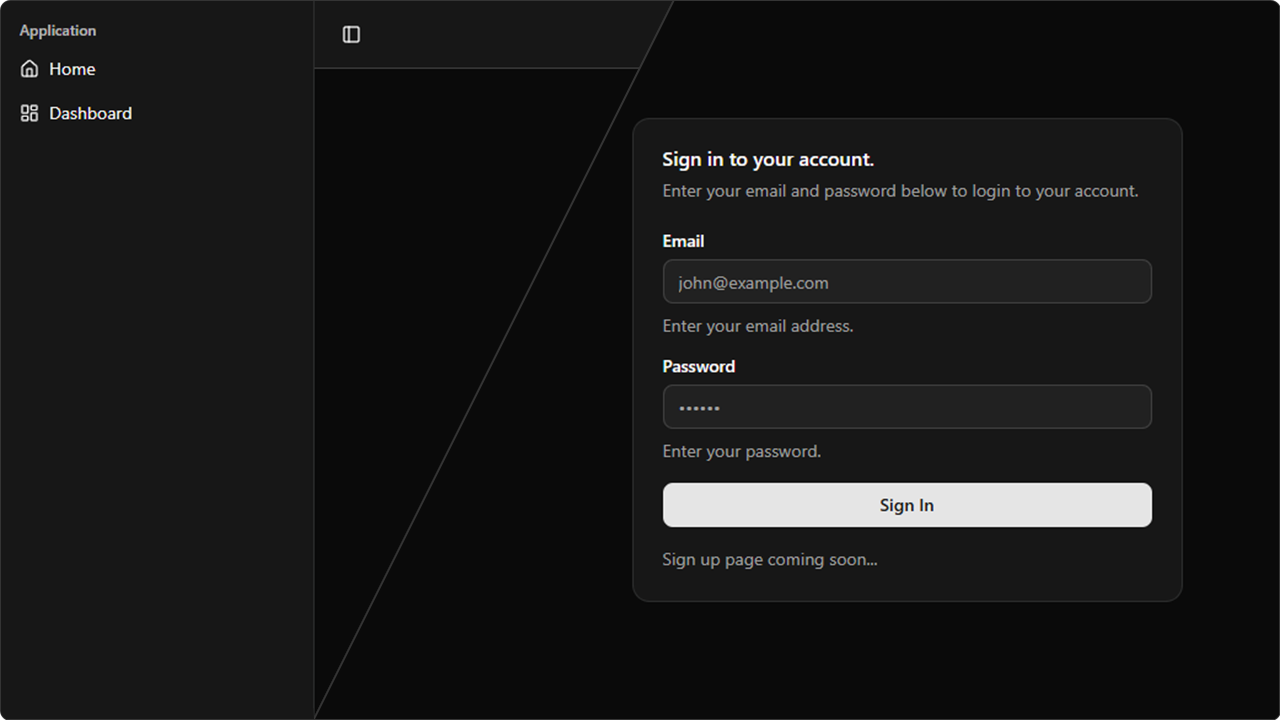
Today was a productive day for Security Asset Platform SaaS product. I implemented the sidebar navigation component and integrated authentication and authorization using Auth.JS. Here is a overview of the source code structure.
├── app
│   ├── dashboard
│   │   └── page.tsx
│   ├── signin
│   │   └── page.tsx
│   └── api
│       └── auth
│           └── [...nextauth]
│               └── route.tsx
├── components
│   ├── app-sidebar.tsx
│   ├── signin-form.tsx
│   └── signout-button.tsx
├── auth.tsx
├── sAuth.tsx
└── middleware.tsx
The auth.tsx file is a configuration file which sets up the authentication and authorization. It’s configured to use Credentials which means that we are responsible for handling the authentication and authorization.
import NextAuth from "next-auth"
import Credentials from "next-auth/providers/credentials"

export const { handlers, signIn, signOut, auth } = NextAuth({
    pages: {
        signIn: "/signin"
    },
    session: { strategy: "jwt"},
    providers: [
        Credentials({
            credentials: {
            email: { label: "Username" },
            password: { label: "Password", type: "password" },
            },
            async authorize(credentials) {
                if (!credentials?.email || !credentials?.password) {
                    return null;
                }

                if (credentials.email == "husenjan@hotmail.com" && credentials.password == "password") {
                    return {
                        id: "1",
                        name: "Husenjan",
                        email: "husenjan@husenjan.com"
                    }
                }

                return null;
            },
        }),
    ],
})
The sAuth.tsx file is a server action file which invokes the signIn function from auth.tsx to perform the authentication. The signInAction is exported and will be used with the signin-form.tsx component to perform the authentication.
"use server";
import { signIn } from "@/auth";

export async function signInAction(credentials : { email : string, password : string}) {
    try {
        await signIn("credentials", {
            email: credentials.email,
            password: credentials.password,
            redirect: false
        });

        return { success : true };
    }
    catch (error) {
        return { success: false, error: "Wrong username or password."}
    }
}
The signin-form.tsx file is the component which displays the sign-in page and processes the sign-in request using the signInAction function from sAuth.tsx file. Once the authentication is successful the user is forwarded to / page.
"use client";
import { signInAction } from "@/sAuth";
import { useState } from "react";
import { Button } from "./ui/button";
import { useRouter } from "next/navigation";
import { z } from "zod";
import { useForm } from "react-hook-form";
import { zodResolver } from "@hookform/resolvers/zod"
import { Form, FormControl, FormDescription, FormField, FormItem, FormLabel } from "./ui/form";
import { Input } from "./ui/input";
import { Card, CardContent, CardDescription, CardHeader, CardTitle } from "./ui/card";
import { toast } from "sonner";

export function SignInForm() {
    const router = useRouter();
    const [isLoading, setIsLoading] = useState(false);

    const form = useForm<z.infer<typeof formSchema>>({
        resolver: zodResolver(formSchema),
        defaultValues : {
            email : "",
            password: ""
        }
    });

    async function onSubmit(values: z.infer<typeof formSchema>) {
        setIsLoading(true);
        try {
            const result = await signInAction({
                email : values.email,
                password : values.password
            });

            if (result.success) {
                router.push("/");
                router.refresh();
            }
            else {
                toast.error("Please check your email and password and try again.");
            }
        } catch(error) {
            toast.error("Please check your email and password and try again.");
        }
        finally{
            setIsLoading(false)
        }
    }
    return (
        ...
    )
}
The middleware.tsx file is responsible for ensuring that only authenticated users can access protected pages and once the user is authenticated they can no longer access the sign in page.
import { auth } from "@/auth";

export default auth((request) => {
    const { nextUrl } = request;

    const isAuthenticated = !!request.auth;

    const isProtectedRoute = ["/dashboard", "/"].includes(nextUrl.pathname);
    const isLoginRoute = ["/signin"].includes(nextUrl.pathname);

    if (isProtectedRoute && !isAuthenticated) {
        return Response.redirect(new URL("/signin", nextUrl));
    }

    if (isLoginRoute && isAuthenticated) {
        return Response.redirect(new URL("/", nextUrl));
    }
});

export const config = {
    matcher: ['/((?!api|_next/static|_next/image|favicon.ico).*)'],
};
The middleware.tsx file will deny access to / and /dashboard pages when the user is unauthenticated but allow access once they are authenticated. It’s responsible to ensure that only authenticated users can access our protected pages.